



1. Introduction to Containerization
1.1 What Is Containerization and Why It Matters
Modern software development demands speed, consistency, and reliability across wildly different environments — from a developer’s laptop to a cloud data center running thousands of servers. Containerization is the technology that makes this possible.
A container is a lightweight, standalone, executable unit that packages an application together with everything it needs to run: code, runtime, system libraries, and configuration. Unlike virtual machines, containers share the host operating system’s kernel, which makes them dramatically faster to start and far more resource-efficient.
1.2 Brief History: From VMs to Containers
To appreciate containers, it helps to understand what came before them. In the early days of computing, applications ran directly on physical servers. Running multiple applications on one server led to dependency conflicts — one app might need Python 2, another Python 3, and never the twain shall meet.
Virtual machines (VMs) solved this by abstracting the hardware. Each VM ran a full operating system, making it completely isolated. The tradeoff was weight: a VM might take minutes to start and consume gigabytes of RAM just for the OS overhead. For many workloads, this was acceptable. For fast-moving, microservices-based applications, it was not.
Linux kernel features — particularly namespaces and control groups (cgroups) — laid the groundwork for lightweight process isolation in the late 2000s. LXC (Linux Containers) formalized this approach in 2008. But it was Docker, released in 2013, that made containers accessible to the mainstream by packaging these kernel primitives into an intuitive developer experience.
Kubernetes arrived in 2014, initially developed by Google based on lessons from their internal Borg system. Where Docker solved the problem of building and running individual containers, Kubernetes solved the far harder problem of managing hundreds or thousands of them across a cluster of machines.
1.3 Overview of Docker and Kubernetes in the Ecosystem
Today, Docker and Kubernetes occupy complementary but distinct roles in the container ecosystem. Docker is primarily a developer tool — it excels at building container images and running them, either individually or in small groups via Docker Compose. It is where containers are created.
Kubernetes is an operations tool — it excels at running containers in production at scale, handling scheduling, scaling, self-healing, and service discovery across a fleet of machines. It is where containers are managed at scale.
2. Docker: The Containerization Engine
2.1 What Is Docker? Architecture and Core Concepts
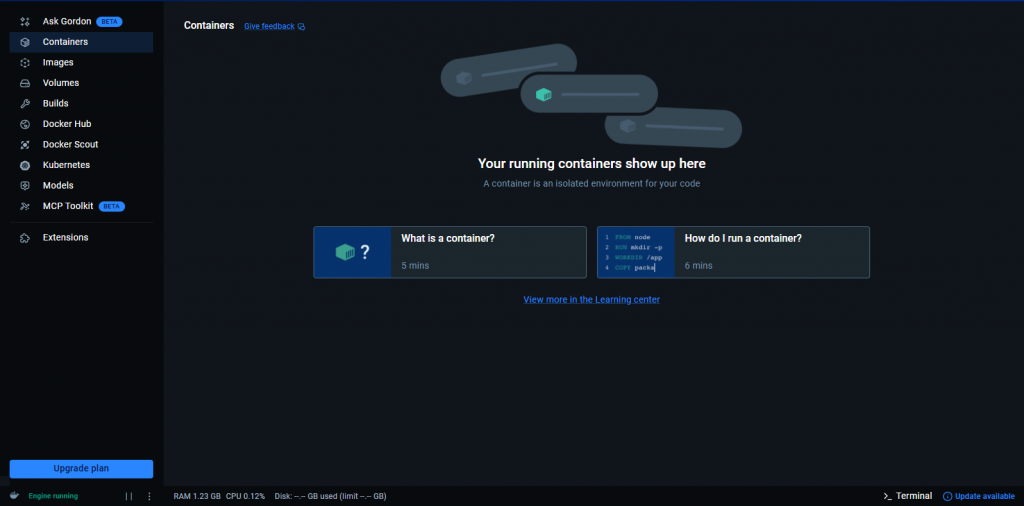
Docker is an open-source platform that automates the deployment of applications inside containers. Released in 2013 by Docker Inc. (then dotCloud), it transformed containers from a niche Linux feature into the industry’s default packaging format for software.
Docker’s architecture follows a client-server model. The Docker client (the CLI tool you type commands into) communicates with the Docker daemon (dockerd), a long-running background service that does the actual work of building, running, and managing containers. The daemon, in turn, uses containerd — a lower-level container runtime — to manage the container lifecycle.
This layered architecture means Docker is both modular and extensible. The daemon can run locally or on a remote host. Multiple clients can connect to the same daemon. And the underlying runtime (containerd) is shared with Kubernetes, which is why images built with Docker run seamlessly on Kubernetes without modification.
2.2 Docker Images, Containers, and Registries
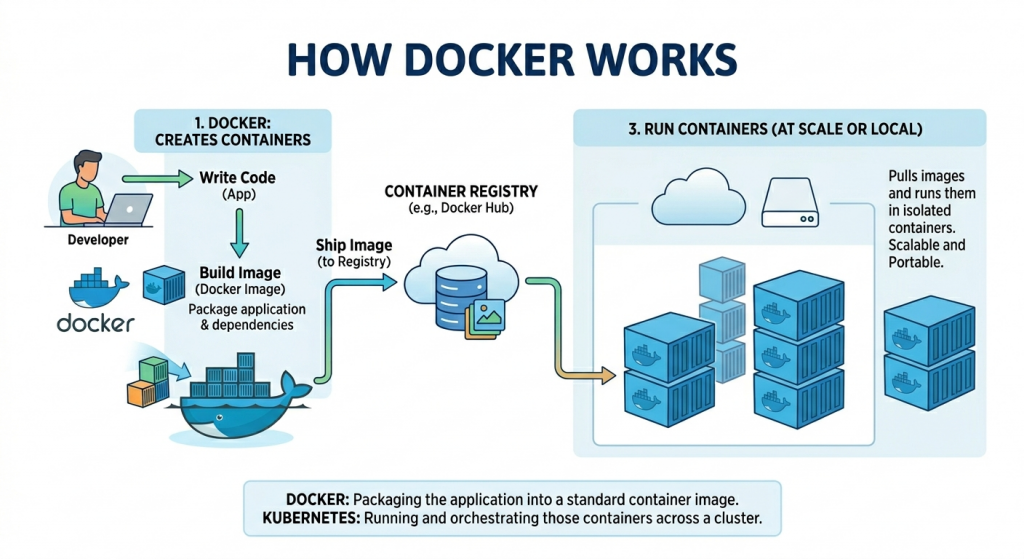
Three concepts are central to understanding Docker:
- Docker Image: A read-only template containing the application and all its dependencies. An image is built in layers, where each layer represents a set of filesystem changes. This layering enables efficient storage and transfer — if two images share the same base layer, it’s only stored once.
- Docker Container: A running instance of an image. A container is what you actually execute. Multiple containers can be created from the same image, each running in an isolated process space. Stopping a container does not delete it; removing it does.
- Docker Registry: A service for storing and distributing Docker images. Docker Hub is the public default, hosting millions of images from official publishers and the community. Private registries (Amazon ECR, Google Artifact Registry, GitHub Container Registry) are standard for proprietary applications.
The workflow is linear: write a Dockerfile, build an image, push it to a registry, and pull it on any machine to run a container. This simplicity is Docker’s greatest strength.
2.3 Dockerfile: Building Images Step by Step
A Dockerfile is a text file containing a sequence of instructions that Docker executes to build an image. Each instruction creates a new layer in the image.
The FROM instruction specifies the base image. Alpine Linux variants are popular for their small size. The WORKDIR sets the working directory inside the container. COPY and RUN build the application layer by layer. CMD specifies the default command to run when the container starts.
Layer caching is a critical optimization concept. Docker caches each layer and only rebuilds layers that have changed. By copying package.json before copying the full source code, you ensure that the expensive npm install step is only re-run when dependencies actually change — not on every code change.
2.4 Docker Compose: Multi-Container Applications
Real applications rarely run in a single container. A web application might consist of a frontend service, a backend API, a PostgreSQL database, and a Redis cache. Docker Compose lets you define and run these multi-container applications using a single YAML file.
A docker-compose.yml file declares each service, its image or Dockerfile, exposed ports, environment variables, volumes, and dependencies. Running docker compose up starts the entire stack with a single command. This makes Docker Compose invaluable for local development environments, where you want to spin up and tear down the full application quickly.
Docker Compose is not designed for production at scale — it runs on a single machine and lacks Kubernetes’ scheduling, self-healing, and distribution capabilities. But for development, testing, and small deployments, it strikes the right balance of simplicity and power.
2.5 Key Use Cases and Limitations of Docker
Docker shines in the following scenarios:
- Local development environments with consistent tooling across teams.
- Building and testing container images in CI/CD pipelines.
- Running simple, single-host multi-service setups with Docker Compose.
- Packaging legacy applications for portability without refactoring.
Docker’s limitations become apparent at scale:
- No built-in scheduling: Docker alone cannot distribute containers across multiple hosts.
- No self-healing: if a container crashes, Docker does not automatically restart it (Docker Compose can, but with limitations).
- No rolling updates: updating a containerized service with zero downtime requires external tooling.
- No service discovery: containers in a multi-host environment cannot find each other without additional configuration.
These limitations are not bugs — they reflect Docker’s design scope. They are the exact problems Kubernetes was built to solve.
3. Kubernetes: Container Orchestration at Scale
3.1 What Is Kubernetes? Origin and Purpose
Kubernetes (often abbreviated as K8s, where 8 represents the eight letters between ‘K’ and ‘s’) is an open-source container orchestration platform originally developed by Google. It was released to the public in 2014 and donated to the Cloud Native Computing Foundation (CNCF) in 2016, where it has since become the cornerstone project of cloud-native infrastructure.
Kubernetes’s lineage traces back to Google’s internal cluster management systems, Borg and Omega, which for over a decade managed the scheduling and operation of Google’s vast computing infrastructure. Kubernetes brings those enterprise-scale lessons to the broader industry.
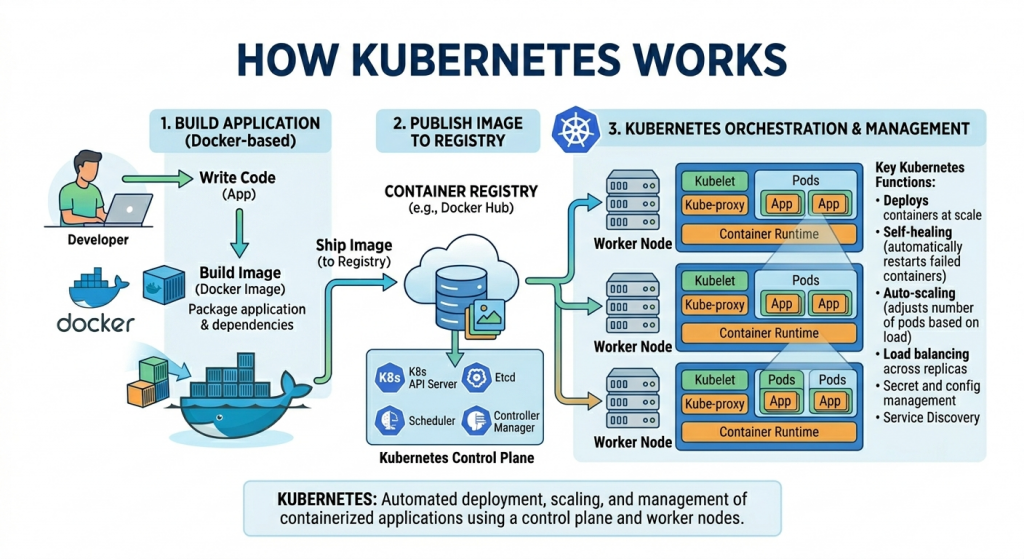
The core purpose of Kubernetes is orchestration: given a desired state (“I want three replicas of this container running, accessible on port 80, with no more than 512MB of RAM each”), Kubernetes continuously works to make the actual state of the cluster match the desired state. It handles placement, restarts, scaling, and routing automatically.
3.2 Core Components: Pods, Nodes, Clusters, Control Plane
Kubernetes introduces a rich vocabulary of objects. Understanding the key components is essential:
- Cluster: The top-level unit — a set of machines (nodes) running Kubernetes, managed as a single system.
- Node: An individual machine (physical or virtual) in the cluster. Nodes run the actual container workloads. A cluster has one or more worker nodes, plus control plane nodes.
- Pod: The smallest deployable unit in Kubernetes. A Pod wraps one or more containers that share a network namespace and storage. Most Pods contain a single container, but sidecar patterns use multiple.
- Control Plane: The brain of Kubernetes. It consists of the API server (the central command and control point), etcd (a distributed key-value store holding cluster state), the scheduler (which assigns Pods to nodes), and controller managers (which maintain desired state).
- kubelet: An agent running on every worker node that ensures the containers described in PodSpecs are running and healthy.
3.3 Deployments, Services, and ConfigMaps
Raw Pods are rarely used directly. Kubernetes provides higher-level abstractions:
- Deployment: Declares the desired state for a set of Pods — how many replicas, which image to run, and update strategy. The Deployment controller continuously reconciles actual state with desired state, restarting crashed Pods and rolling out updates gracefully.
- Service: A stable network endpoint for a set of Pods. Because Pods are ephemeral and their IP addresses change, Services provide a consistent DNS name and IP address that load-balances traffic across all healthy matching Pods.
- ConfigMap: Stores non-sensitive configuration data (environment variables, config files) separately from the container image, making applications more portable across environments.
- Secret: Similar to ConfigMap but intended for sensitive data like passwords, API keys, and TLS certificates. Secrets are base64-encoded and can be encrypted at rest.
- Namespace: A virtual cluster within a cluster, used to isolate resources between teams, projects, or environments (dev, staging, production).
3.4 Auto-scaling, Load Balancing, and Self-healing
These three capabilities are where Kubernetes delivers its most dramatic value over standalone Docker:
Self-healing is fundamental to Kubernetes’ design. When a Pod crashes, the controlling Deployment automatically creates a replacement. When a node fails, the scheduler reschedules its Pods to healthy nodes. Liveness probes continuously check whether a container is functioning; if a probe fails, Kubernetes restarts the container. Applications running on Kubernetes achieve a level of resilience that would require significant custom tooling to replicate otherwise.
Horizontal Pod Autoscaling (HPA) monitors CPU and memory utilization across Pods and automatically adjusts the replica count to match demand. During a traffic spike, Kubernetes spins up additional replicas. When demand drops, it scales back down. With Cluster Autoscaler, this can extend to adding and removing nodes from the cluster itself, enabling truly elastic infrastructure.
Load balancing in Kubernetes operates at multiple levels. Services distribute traffic across Pod replicas at the cluster level. Ingress controllers (like nginx-ingress or the cloud provider’s native load balancer) handle external HTTP/S traffic, providing host-based and path-based routing, TLS termination, and rate limiting.
3.5 Key Use Cases and Limitations of Kubernetes
Kubernetes is the right tool for:
- Production microservices architectures require high availability.
- Applications with variable traffic needing elastic auto-scaling.
- Multi-tenant platforms where teams deploy independently.
- CI/CD pipelines that need reliable, reproducible deployment targets.
- Stateful workloads using StatefulSets and PersistentVolumes.
Kubernetes’ limitations are real and should not be minimized:
- Steep learning curve: The concept count (Pods, Deployments, Services, Ingress, ConfigMaps, Namespaces, RBAC…) is genuinely daunting for newcomers.
- Operational overhead: Running and maintaining a Kubernetes cluster, even a managed one, requires meaningful expertise.
- Overkill for small applications: A three-tier app with low traffic does not benefit from Kubernetes’ complexity.
- Debugging difficulty: Tracing issues through layers of abstraction is harder than debugging a single Docker container.
4. Docker vs. Kubernetes: Head-to-Head Comparison
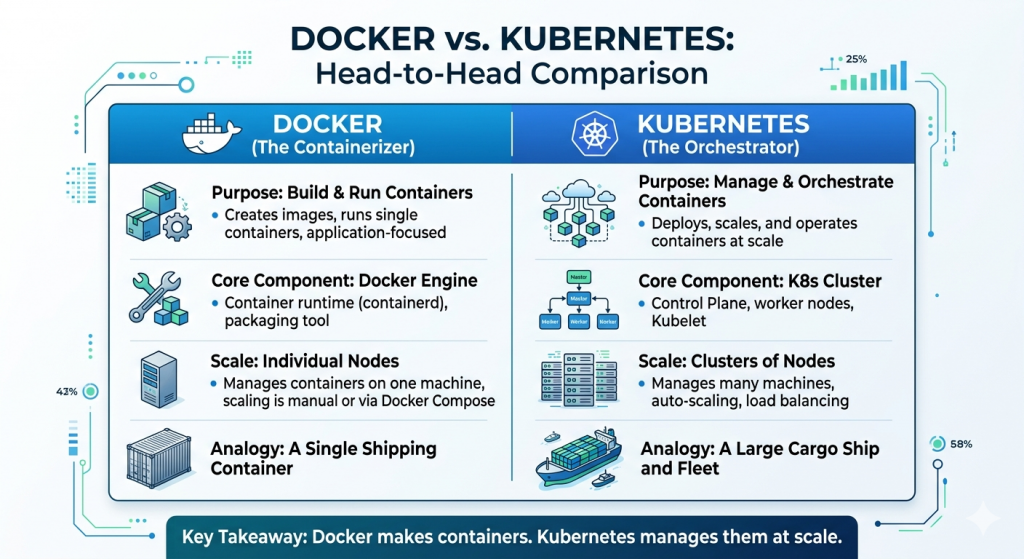
4.1 Core Purpose: Building vs. Orchestrating Containers
The most important distinction is one of role, not competition. Docker is fundamentally a build and run tool. Its primary job is to take a Dockerfile and produce a container image, then run that image as a container. Kubernetes is a runtime management platform. Its job is to take container images (built by any tool) and run them reliably across a cluster of machines.
4.2 Comparison at a Glance
| Dimension | Docker | Kubernetes |
|---|---|---|
| Purpose | Build & run containers | Orchestrate containers at scale |
| Scope | Single host | Multi-node clusters |
| Complexity | Low — easy to learn | High — steep learning curve |
| Scalability | Manual, limited | Automatic, enterprise-grade |
| Networking | Bridge/host/overlay | ClusterIP, NodePort, Ingress |
| Self-healing | No | Yes — restarts failed pods |
| Load balancing | Basic (Compose) | Built-in, advanced |
| Storage | Volumes, bind mounts | PersistentVolumes, StorageClass |
| Config mgmt. | Env vars, .env files | ConfigMaps, Secrets |
| Best for | Dev, local, simple apps | Production microservices |
4.3 Scalability: Single Host vs. Multi-node Clusters
Docker, even with Docker Compose, is fundamentally a single-host technology. You can run many containers on one powerful machine, but the moment you need to distribute work across multiple machines, you need a different tool. Docker Swarm was Docker’s answer to this problem, but it has largely ceded the market to Kubernetes.
4.4 Networking, Storage, and Security Differences
Networking in Docker is relatively straightforward. Containers on the same bridge network can communicate by container name. Port mapping exposes container ports to the host. Docker Compose creates a private network for each stack automatically.
Kubernetes networking is more sophisticated and, necessarily, more complex. Every Pod gets its own IP address. Service resources provide stable DNS names. The Container Network Interface (CNI) allows pluggable networking backends (Calico, Flannel, Cilium) with different capabilities, including network policies that control which Pods can communicate with which others.
4.5 Community, Ecosystem, and Tooling
Both projects have enormous, active communities. Docker’s ecosystem includes Docker Hub (with millions of public images), Docker Desktop, and integrations in virtually every IDE and CI platform. It remains the dominant image format — even Kubernetes uses Docker-format images.
5. How Docker and Kubernetes Work Together
5.1 Docker Builds the Image, Kubernetes Runs It
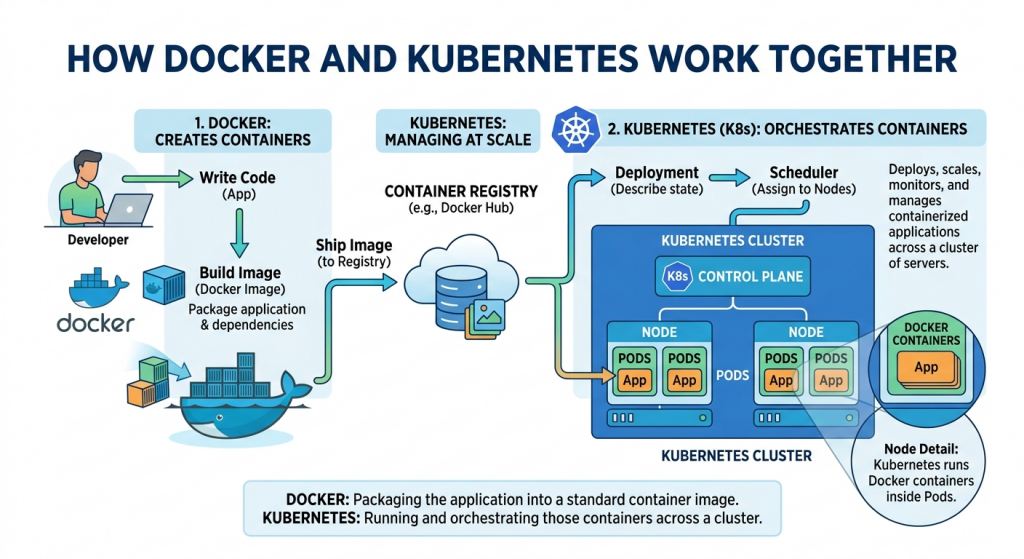
The most common production pattern is simple and elegant: Docker (or a compatible build tool) produces container images, and Kubernetes runs them. A developer writes code, writes a Dockerfile, and runs docker build. The resulting image gets pushed to a registry. Kubernetes then pulls the image and schedules it across the cluster.
Neither tool is aware of the other’s internal workings. Kubernetes does not care how the image was built — only that it conforms to the OCI (Open Container Initiative) image specification, which Docker images do. This decoupling is a strength: teams can switch build tools (to Buildah, Kaniko, or others) without changing their Kubernetes configuration, and vice versa.
5.2 Container Runtimes: containerd and CRI-O
A common source of confusion: Kubernetes deprecated direct Docker support in version 1.20 (completed in 1.24). This alarmed many developers, but the practical impact is minimal. Kubernetes never needed all of Docker — it only needed Docker’s container runtime layer.
Kubernetes uses the Container Runtime Interface (CRI) to communicate with container runtimes. Both containerd (the runtime Docker itself uses under the hood) and CRI-O are CRI-compatible. When Kubernetes deprecated dockershim (its Docker-specific adapter), it was removing an unnecessary translation layer — not abandoning Docker images. Every Docker image continues to run perfectly on modern Kubernetes clusters.
5.3 A Typical CI/CD Pipeline Using Both Tools
A production CI/CD pipeline typically looks like this:
- Developer pushes code to a Git repository (GitHub, GitLab, etc.).
- CI system (GitHub Actions, Jenkins, CircleCI) triggers a pipeline.
- The pipeline runs tests, then executes a Docker build to create a new image.
- The image is pushed to a container registry (ECR, GCR, Docker Hub) with a unique tag (usually the Git commit SHA).
- The pipeline updates the Kubernetes Deployment manifest with the new image tag.
- kubectl apply (or Argo CD/Flux) applies the change to the cluster.
- Kubernetes performs a rolling update: bringing up new Pods with the new image before terminating old ones, ensuring zero downtime.
This pipeline gives teams rapid iteration with production safety. Docker handles the packaging concern; Kubernetes handles the deployment concern. Each tool does what it does best.
6. Choosing the Right Tool for Your Project
6.1 Small Projects and Local Dev: Docker Is Enough
Not every application needs Kubernetes. If you are building a side project, a small internal tool, or an early-stage product with predictable, modest traffic, Docker and Docker Compose will serve you well — and with far less operational overhead.
Docker Compose can run a complete multi-service application on a single server. With a reverse proxy (like Traefik or Caddy) in front, you can achieve basic load balancing and TLS termination. For applications with a few hundred concurrent users and no extreme availability requirements, this is entirely adequate.
6.2 Production-scale Microservices: When to Adopt Kubernetes
Kubernetes becomes the appropriate choice when any of the following apply:
- Your application consists of many independent services that need to scale independently.
- You need high availability with automatic failover when nodes fail,
- Traffic is variable, and you want to scale infrastructure costs with demand.
- Multiple teams are deploying to the same infrastructure and need isolation.
- You need fine-grained network policies, RBAC, and audit logging for compliance.
- You are deploying ML workloads requiring GPU scheduling and resource quotas.
The tipping point is often organizational as much as technical. When a single Docker Compose file becomes a coordination nightmare across teams, or when a weekend node failure takes down production, the investment in Kubernetes starts to pay for itself.
6.3 Managed Kubernetes Options: EKS, GKE, AKS
Running a self-managed Kubernetes cluster is significant operational work. The major cloud providers offer managed Kubernetes services that handle the control plane for you, dramatically reducing the operational burden:
- Amazon EKS (Elastic Kubernetes Service): AWS’s managed offering. Deep integration with IAM, ALB, EBS, and other AWS services. The de facto choice for AWS-native organizations.
- Google GKE (Google Kubernetes Engine): Google’s offering, benefiting from Kubernetes’ origin at Google. Often considered the most feature-complete and smoothest managed experience. Autopilot mode manages nodes automatically.
- Azure AKS (Azure Kubernetes Service): Microsoft’s offering. Strong integration with Azure AD, Azure Monitor, and the broader Microsoft ecosystem. Popular in enterprise environments.
All three eliminate the need to manage the Kubernetes control plane, handle version upgrades with minimal downtime, and integrate with their cloud provider’s storage, networking, and identity services. For most teams, starting with a managed service is strongly recommended.
8. Conclusion
Docker and Kubernetes are not rivals — they are partners in the container ecosystem, each solving a distinct set of problems. Docker democratized containers by making them easy to build and run. Kubernetes made it possible to run those containers reliably at any scale.
The key insight is that the tools exist on a spectrum of complexity matched to a spectrum of need. A solo developer building a weekend project should reach for Docker. A platform team supporting dozens of microservices and hundreds of daily deployments should invest in Kubernetes. Most organizations will use both, leveraging Docker for development and Kubernetes for production.
If you are just starting your containerization journey, begin with Docker. Learn to write efficient Dockerfiles, understand image layering, and use Docker Compose to model multi-service applications. These skills transfer directly to Kubernetes, where your images become the atoms that Kubernetes orchestrates.
Leave a Reply