



1. What Is Windows VPS Hosting?
Windows VPS hosting is a virtual private server running the Windows Server operating system instead of Linux. It gives developers full administrative (RDP) access to a dedicated slice of server resources — CPU, RAM, and storage — specifically configured to run ASP.NET, ASP.NET Core, MSSQL, IIS, and other Windows-native applications. Unlike shared hosting, a Windows VPS isolates your environment so your site’s performance isn’t affected by other tenants, while costing far less than a dedicated server.
If you’re building or deploying a .NET application, a Windows VPS is usually the most practical middle ground between affordable shared hosting and expensive dedicated infrastructure.
2. Why ASP.NET and Windows Apps Need Windows VPS Hosting
ASP.NET, ASP.NET Core, Classic ASP, and many enterprise Windows applications are built around the Windows Server stack — Internet Information Services (IIS), the .NET runtime, and Microsoft SQL Server. While .NET Core technically supports cross-platform deployment on Linux, most businesses still prefer Windows Server because:
- Native IIS integration simplifies application pools, SSL bindings, and URL rewriting.
- MSSQL compatibility is seamless, avoiding the connector workarounds needed on Linux.
- Remote Desktop Protocol (RDP) gives a familiar graphical interface, unlike SSH-only Linux environments.
- Legacy application support for older ASP.NET Framework apps (pre-.NET Core) that cannot run on Linux at all.
- Active Directory and Windows authentication integration for enterprise intranet tools.
For agencies and developers managing multiple client sites built in .NET, a Windows VPS removes the guesswork of compatibility testing.
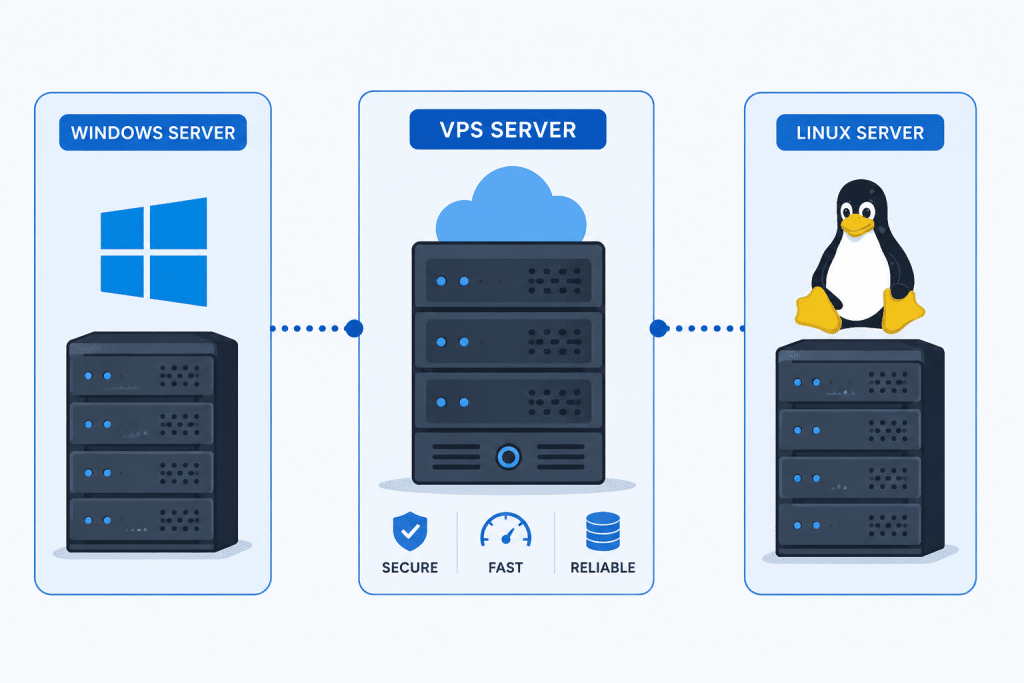
3. Windows VPS vs Linux VPS: Key Differences
| Factor | Windows VPS | Linux VPS |
|---|---|---|
| Best for | ASP.NET, .NET Core, MSSQL, legacy Windows apps | PHP, Python, Node.js, open-source stacks |
| Access method | RDP (graphical) | SSH (command line) |
| License cost | Included or licensed separately | Free (open source) |
| Resource overhead | Higher (GUI + services) | Lower |
| Database fit | MSSQL Server | MySQL, PostgreSQL, MariaDB |
| Learning curve | Easier for Windows-native admins | Easier for developers familiar with Linux |
Neither option is universally “better” — the right choice depends entirely on your application stack. If your codebase is ASP.NET or depends on MSSQL, Windows VPS hosting is the more reliable, lower-friction option.
4. Core Components of a Good Windows VPS Plan
When evaluating Windows VPS hosting for ASP.NET or Windows-based applications, look closely at these technical specifications:
4.1 CPU Cores and RAM
ASP.NET applications, especially those running IIS application pools alongside MSSQL, are memory-hungry. A minimum of 4GB RAM and 2 vCPU cores is recommended for small to medium production apps; larger applications or multiple sites should start at 8GB+ RAM.
4.2 SSD/NVMe Storage
Windows Server itself consumes more disk space than Linux distributions. NVMe storage significantly speeds up IIS site loading, MSSQL query performance, and Windows Update processes.
4.3 Windows Server Licensing
Confirm whether the host includes a licensed copy of Windows Server (2019/2022/2025) in the plan price, since standalone licensing can be costly if purchased separately.
4.4 RDP Access
Full administrative RDP access is essential for installing IIS roles, configuring application pools, managing SSL certificates, and running Windows Update.
4.5 Control Panel Options
Some providers include Plesk for Windows, which simplifies site management, SSL issuance, and database administration through a graphical dashboard — useful for teams without a dedicated sysadmin.
4.6 Backup and Snapshot Features
Automated daily backups or snapshot rollback features protect against failed deployments or misconfigurations, which are more common during ASP.NET version upgrades.
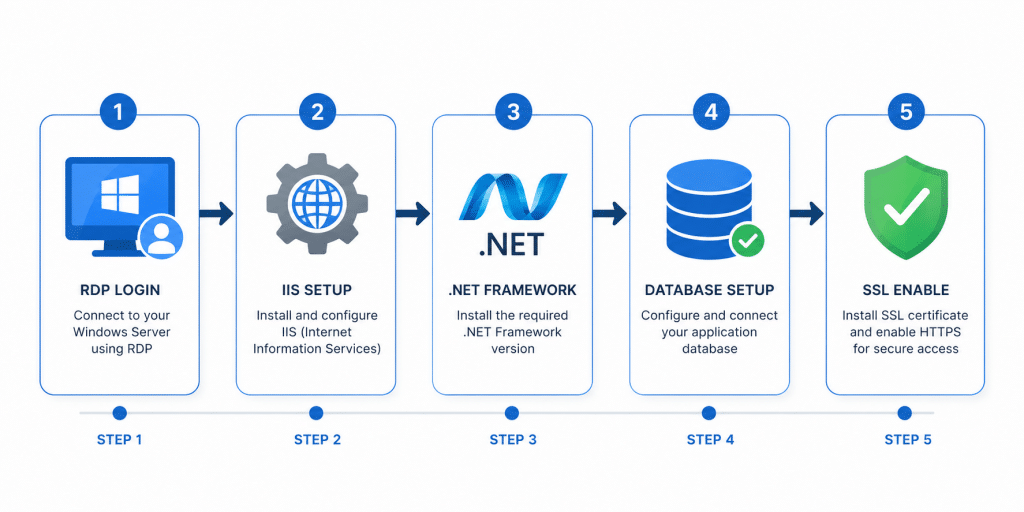
5. Setting Up ASP.NET on a Windows VPS: Step-by-Step
Here’s a general workflow for deploying an ASP.NET or ASP.NET Core application on a fresh Windows VPS:
- Connect via RDP using the credentials provided by your hosting provider.
- Enable IIS through Server Manager → Add Roles and Features → Web Server (IIS).
- Install the .NET Hosting Bundle (for ASP.NET Core) or confirm the .NET Framework version (for Classic ASP.NET) matches your application’s target framework.
- Create a new Application Pool in IIS Manager, setting the correct .NET CLR version and pipeline mode.
- Deploy your application files via FTP, RDP file transfer, or a CI/CD pipeline (e.g., GitHub Actions, Azure DevOps).
- Bind your domain and SSL certificate in IIS Manager under Site Bindings.
- Configure your database connection string to point to your MSSQL instance, whether local or remote.
- Set up a firewall rule to allow inbound traffic on port 443 (HTTPS) and restrict RDP access (port 3389) to trusted IPs only.
- Test thoroughly using a staging subdomain before pointing your live domain.
- Schedule backups and enable Windows Update settings to apply security patches without unexpected downtime.
6. Security Best Practices for Windows VPS Hosting
Windows Server is a frequent target for brute-force RDP attacks and outdated IIS exploits. Strengthen your VPS with these measures:
- Change the default RDP port away from 3389 to reduce automated scanning attempts.
- Enable Network Level Authentication (NLA) for RDP connections.
- Use a VPN or IP whitelist to restrict RDP access to known locations only.
- Keep Windows Update active — Windows Server requires consistent patching, more so than most Linux distributions.
- Install and configure Windows Defender or a third-party endpoint protection tool.
- Enforce strong password policies and consider two-factor authentication for administrator accounts.
- Regularly audit IIS logs for unusual traffic patterns or repeated failed login attempts.
- Disable unused Windows services and roles to shrink the attack surface.
A managed Windows VPS plan often includes proactive patching and monitoring, which is worth the added cost for teams without in-house Windows server expertise.
7. Performance Optimization Tips for ASP.NET on VPS
Once your application is live, ongoing tuning keeps it fast and stable:
- Enable output caching in IIS for static or semi-static content.
- Use application pool recycling schedules during low-traffic hours rather than relying on default crash-triggered recycling.
- Optimize MSSQL indexes regularly, especially as your database grows.
- Enable HTTP/2 and Gzip/Brotli compression in IIS for faster page loads.
- Monitor resource usage through Windows Performance Monitor or third-party APM tools to catch memory leaks early.
- Offload static assets (images, CSS, JS) to a CDN to reduce VPS bandwidth load.
8. Who Should Choose Windows VPS Hosting?
Windows VPS hosting is the right fit if you are:
- Running a legacy ASP.NET Framework application that cannot be ported to Linux.
- Building enterprise software dependent on MSSQL Server or Active Directory.
- Hosting Windows-specific desktop-to-web bridge applications, such as Remote App or Windows-based ERP/CRM systems.
- A development agency managing multiple client sites built with .NET technologies.
- Needing a familiar GUI environment (RDP) rather than command-line-only server management.
If your project is instead built in PHP, Python, or a typical LAMP/LEMP stack, a Linux VPS will almost always be cheaper and more resource-efficient.
9. Frequently Asked Questions
9.1 Is Windows VPS hosting more expensive than Linux VPS?
Generally yes, due to Windows Server licensing costs bundled into the plan price. However, the difference is often justified by reduced compatibility issues for ASP.NET and MSSQL-dependent applications.
9.2 Can I run ASP.NET Core on a Linux VPS instead?
Yes — ASP.NET Core is cross-platform and can run on Linux using Kestrel or Nginx as a reverse proxy. However, classic ASP.NET Framework applications require Windows Server.
9.3 What Windows Server version should I choose for a new VPS?
Windows Server 2022 is currently the most widely supported and recommended version for new ASP.NET deployments, offering improved security defaults and better container support than older releases.
9.4 Do I need a control panel like Plesk for Windows VPS?
Not strictly, but it significantly simplifies site, SSL, and database management for users less comfortable navigating IIS Manager manually.
9.5 How much RAM does an ASP.NET application typically need on a VPS?
A small to medium production application typically runs comfortably on 4–8GB RAM, while larger applications with heavier MSSQL workloads may need 16GB or more.
10. Final Thoughts
Windows VPS hosting remains the most practical environment for ASP.NET, ASP.NET Core, and broader Windows-based application deployment — particularly when MSSQL integration, IIS configuration, or legacy framework support is involved. The key is matching your plan’s CPU, RAM, and storage specifications to your application’s actual demands, while following sound security practices around RDP access and patching.
For developers and businesses building on the .NET stack, investing in a properly sized, managed Windows VPS plan reduces compatibility headaches and gives you the administrative control needed to scale confidently.
Leave a Reply