



1. How Does AI Improve WordPress Malware Scanning?
AI-powered WordPress security tools use machine learning models trained on massive datasets of known malware signatures, suspicious code patterns, and behavioral anomalies to detect threats that traditional signature-based scanners often miss — including zero-day exploits and obfuscated malicious code. Instead of only matching known malware fingerprints, AI scanners analyze behavior, context, and code structure, flagging files that act suspiciously even if they’ve never been seen before. This results in faster detection, fewer false positives over time, and the ability to automatically quarantine or block threats before they spread.
2. Why Traditional WordPress Security Scanning Falls Short
For years, WordPress security plugins relied primarily on signature-based detection — comparing files against a database of known malware patterns. While still useful, this approach has clear limitations:
- Zero-day threats go undetected until a signature is manually added after an attack has already occurred elsewhere.
- Obfuscated or polymorphic malware can disguise itself just enough to slip past pattern matching.
- High false-positive rates on legitimate but unusually structured code, leading to wasted time investigating non-threats.
- Reactive, not proactive, since signature databases only update after new malware is identified and cataloged.
AI-based scanning addresses these gaps by learning patterns of malicious intent rather than relying solely on exact matches, making it significantly more effective against new and evolving threats.
3. How AI-Powered Malware Detection Actually Works
Understanding the mechanics helps clarify why AI scanning is more resilient than older methods:
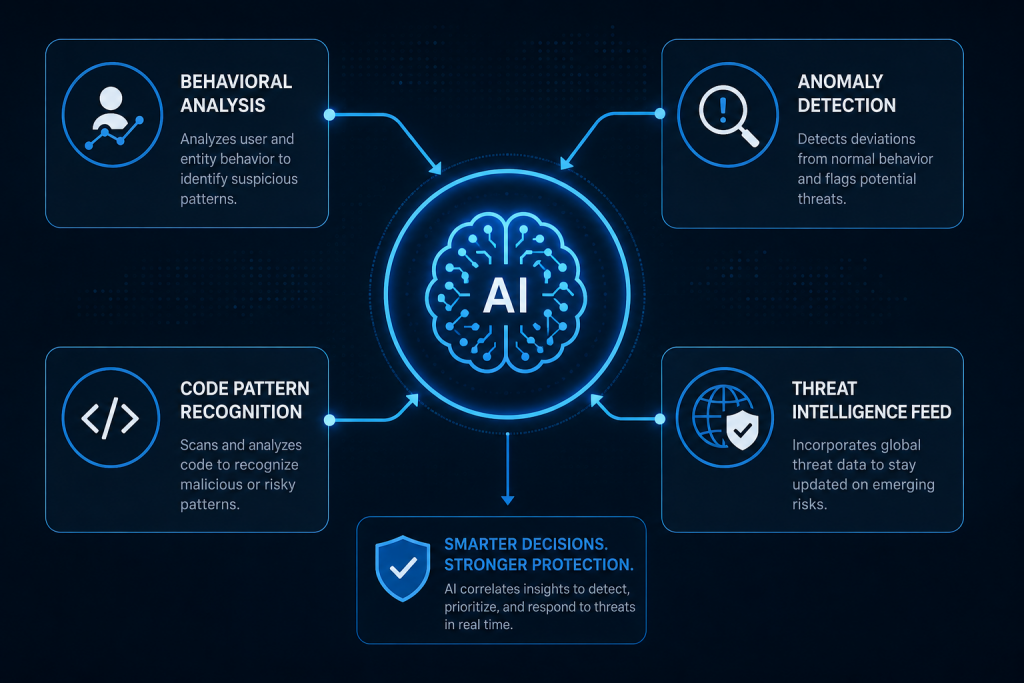
3.1 Behavioral Analysis
AI models monitor how files and scripts behave — not just what they contain. A file attempting to modify core WordPress files, send unexpected outbound requests, or escalate user privileges triggers alerts even if its code doesn’t match any known malware signature.
3.2 Anomaly Detection
By establishing a baseline of “normal” site behavior (file structure, login patterns, plugin activity), AI systems flag deviations — such as a sudden spike in failed login attempts or an unfamiliar admin account being created at 3 AM.
3.3 Code Pattern Recognition
Machine learning models trained on millions of malware samples can recognize obfuscation techniques, suspicious encoding patterns (like heavily nested base64 strings), and structural red flags common in malicious scripts, even when the exact code is new.
3.4 Natural Language Threat Intelligence
Some advanced security platforms use AI to continuously scan security advisories, vulnerability databases, and threat intelligence feeds, automatically updating detection rules faster than manual signature updates could keep pace.
4. Popular AI-Driven WordPress Security Tools
Several established WordPress security plugins and platforms now incorporate AI or machine learning components into their scanning engines:
| Tool Category | What AI Adds |
|---|---|
| AI-enhanced firewall plugins | Real-time traffic pattern analysis to block bot attacks and credential stuffing |
| Malware scanning plugins | Behavioral + signature hybrid detection for known and unknown threats |
| Managed hosting security layers | Server-level AI monitoring across all hosted sites for emerging attack patterns |
| Login protection tools | AI-based anomaly detection for unusual login locations, times, or velocity |
When evaluating tools, look specifically for language around “behavioral detection,” “heuristic scanning,” or “machine learning-based threat detection” rather than just “malware scanning” — the terminology often signals whether AI is genuinely part of the detection engine or just a marketing label.
5. Step-by-Step: Setting Up AI-Based Malware Scanning on WordPress
- Choose a security plugin or service with genuine AI/ML-based detection — check documentation or vendor claims for specifics on behavioral or heuristic analysis, not just signature matching.
- Install and activate the plugin through your WordPress dashboard, or enable the security module if it’s part of your hosting panel.
- Run an initial full-site scan to establish a security baseline and identify any pre-existing infections.
- Configure real-time monitoring, enabling continuous background scanning rather than relying solely on scheduled scans.
- Set up automated alerts via email, SMS, or dashboard notifications for detected threats, suspicious logins, or file changes.
- Enable automatic quarantine or blocking features if available, so threats are neutralized immediately rather than waiting for manual review.
- Review the AI-generated threat reports periodically — many tools provide confidence scores or risk ratings that help prioritize which alerts need urgent attention.
- Whitelist known-safe custom code or plugins that may trigger false positives due to unusual but legitimate scripting patterns.
- Integrate with your firewall (if using a separate WAF) so AI-detected threats at the application layer are also blocked at the network level.
- Schedule periodic manual reviews of flagged files and login activity logs, since AI systems work best alongside human oversight, not as a complete replacement for it.
6. Setting Up Automated Response Rules
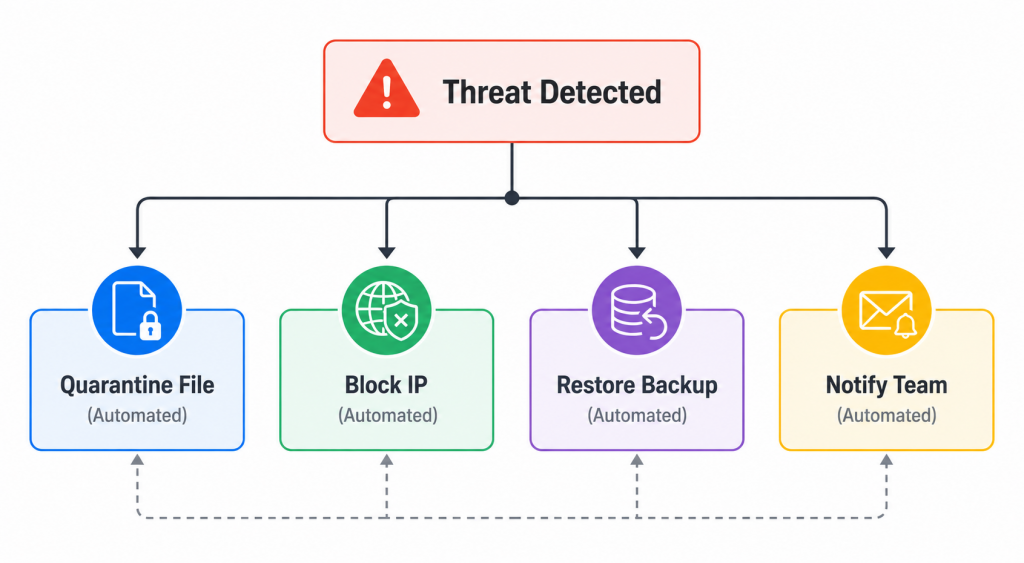
Beyond detection, many AI-powered tools allow you to configure automated responses, reducing the time between threat identification and resolution:
- Auto-quarantine infected files to a secure folder rather than deleting them outright, preserving evidence for review.
- Auto-block IP addresses showing brute-force login patterns or known malicious bot signatures.
- Auto-restore from clean backups when critical core files are detected as modified, assuming a recent clean backup exists.
- Auto-notify your team through Slack, email, or SMS integrations the moment a high-confidence threat is detected.
- Auto-disable compromised plugins temporarily until a manual review confirms safety.
Automated response rules should be configured conservatively at first — overly aggressive auto-blocking can occasionally flag legitimate traffic or admin activity, so monitor logs closely during the first few weeks of deployment.
7. Reducing False Positives in AI Security Tools
AI scanning is powerful, but not infallible. These practices help reduce unnecessary alerts and wasted investigation time:
- Train the system on your site’s specific baseline by allowing an initial learning period before enabling strict auto-blocking.
- Maintain a whitelist of custom plugins, themes, or scripts known to behave unusually but safely.
- Review confidence scores rather than treating every flag as equally urgent — most AI tools rate detections by certainty level.
- Update the plugin/tool regularly, since AI models themselves are periodically retrained and refined by vendors to reduce false positive rates over time.
8. AI Security vs. Traditional Security: A Practical Comparison
| Factor | Traditional Signature-Based | AI/ML-Based |
|---|---|---|
| Zero-day threat detection | Weak | Strong |
| False positive rate | Lower initially, but rigid | Higher initially, improves with learning |
| Update dependency | Requires manual signature updates | Continuously adapts via behavioral learning |
| Resource usage | Generally lighter | Can be more resource-intensive |
| Best for | Known, cataloged threats | Emerging, obfuscated, or novel threats |
The most effective WordPress security setups typically combine both approaches — using signature-based scanning for known threats and AI-based behavioral analysis as a second layer for anything novel or disguised.
9. Best Practices for Long-Term AI-Powered WordPress Security
- Layer your defenses: combine AI malware scanning with a web application firewall (WAF), strong password policies, and two-factor authentication.
- Keep WordPress core, themes, and plugins updated, since AI detection works best as a safety net, not a substitute for basic patching hygiene.
- Maintain regular off-site backups so AI-detected infections can be remediated quickly via restoration if needed.
- Limit user permissions to reduce the potential damage radius if an account is compromised, even with AI monitoring in place.
- Review security logs weekly, even with automation active, to catch patterns that automated systems might still misclassify or under-prioritize.
- Test your incident response plan periodically — knowing how to respond when AI flags a genuine threat is as important as the detection itself.
10. Frequently Asked Questions
10.1 Can AI completely replace manual WordPress security monitoring?
No — AI significantly reduces manual workload and catches threats traditional methods miss, but human review remains important for context, especially around false positives and complex incident response decisions.
10.2 Does AI-based malware scanning slow down my WordPress site?
Some AI scanning tools, particularly those running continuous behavioral analysis, can add slight server overhead. Choosing a tool with server-level scanning (often available through managed hosting) rather than purely plugin-based scanning can reduce this impact.
10.3 How quickly can AI detect a new type of malware?
AI models can often flag suspicious behavior in real time, even for malware variants never seen before, since detection is based on behavioral patterns rather than waiting for a matching signature to be added to a database.
10.4 Is AI-based WordPress security worth it for small websites?
Yes — many AI-enhanced security plugins are available at reasonable price points or even within free tiers, making this protection accessible even for smaller sites that are still frequent targets of automated bot attacks.
10.5 What should I do if AI flags a false positive?
Review the flagged file or activity, confirm it’s legitimate, then add it to your tool’s whitelist or exception list so future scans don’t flag the same item again.
11. Final Thoughts
AI has meaningfully changed what’s possible in WordPress security, shifting detection from reactive signature matching toward proactive, behavior-based threat identification. For site owners and agencies managing multiple WordPress installations, AI-powered malware scanning offers faster detection, automated response capabilities, and protection against threats that traditional tools simply can’t catch in time. The most resilient setups treat AI as one critical layer within a broader security strategy — paired with regular updates, strong access controls, and consistent backup practices — rather than a single fix-all solution.
Leave a Reply