A decade ago, a DDoS attack meant a few hundred megabits of junk traffic aimed at your server, and a good firewall could ride it out. In 2026, botnets built from millions of hijacked routers, cameras and cloud instances routinely generate attacks measured in terabits per second — more traffic than most entire data centres can accept, let alone one server. No single machine, however powerful, can absorb that. The defence that actually works has moved outward: distributed edge networks that stop an attack close to where it starts, long before it reaches your infrastructure. This guide explains how that works, layer by layer, and what it means for anyone running a website or application on a VPS.
If you are new to the topic, start with our primer on what a DDoS attack is and how it targets a VPS — this article builds on those basics.
What Is a Distributed Edge Network?
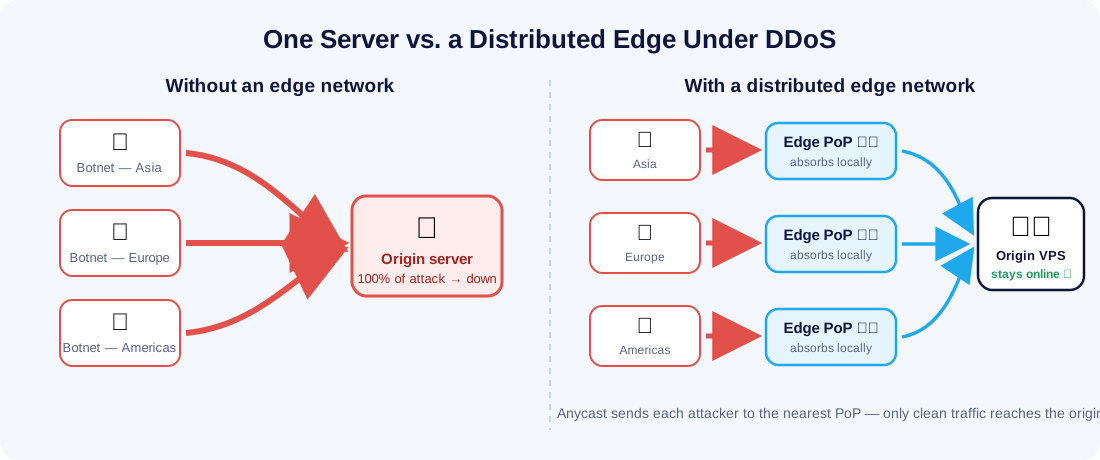
A distributed edge network is a fleet of servers — often hundreds of points of presence (PoPs) — deployed in cities around the world, sitting between the public internet and your origin server. Instead of every visitor connecting directly to your machine, they connect to the nearest edge location, which then talks to your origin over an optimised path. Content delivery networks (CDNs) pioneered this design to serve cached content faster; modern edge networks extend it into a security perimeter: TLS termination, web application firewalls, bot management and — the subject of this article — DDoS mitigation all happen at the edge.
The security value comes from two properties that a single server can never have: enormous aggregate capacity (the combined bandwidth of hundreds of PoPs dwarfs any attack yet recorded) and proximity to the attacker (malicious traffic is filtered in the region where it originates, instead of crossing the world to die at your firewall).
Why Defending From a Single Location No Longer Works
Traditional DDoS defence lives at the destination: a hardware appliance or a host firewall in front of the origin. That model fails against modern attacks for a simple physical reason — by the time the traffic reaches your firewall, it has already won. Your server's uplink might be 1–10 Gbps. A mid-sized volumetric attack is 50–500 Gbps; record attacks are far larger. The flood saturates the network pipe before any filtering rule can run, so it does not matter how clever the rules are. As we covered in firewalls and DDoS protection, a firewall remains essential for what it does well — blocking unwanted ports and protocols — but it cannot un-fill a saturated pipe.
There is also an asymmetry of cost. Reflection and amplification techniques let an attacker turn a small botnet into a huge flood: a 60-byte DNS query with a spoofed source address can trigger a multi-kilobyte response aimed at the victim. The attacker spends almost nothing; the defender needs capacity to absorb everything. The only way to win an asymmetric game is to change the field — which is exactly what distributing the defence across an edge network does.
How Edge Networks Neutralise an Attack
Layer 1: Anycast routing dilutes the flood
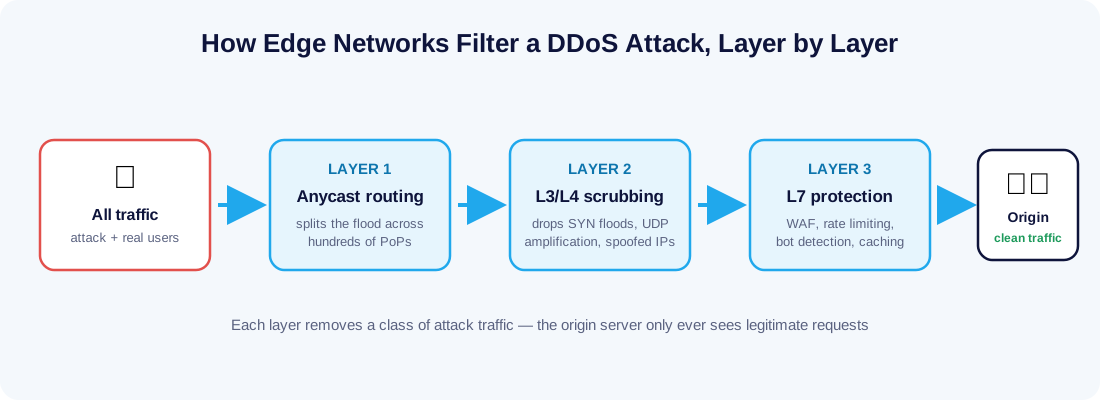
Edge networks announce the same IP addresses from every PoP using anycast routing. The internet's routing system then automatically delivers each packet to the topologically nearest location. For normal users this just means lower latency — but during an attack it is a superpower. A botnet is, by definition, distributed: its bots sit in thousands of networks across every continent. Anycast splinters their combined flood into hundreds of small streams, each arriving at a different PoP. A 2 Tbps global attack might land as a few Gbps per location — a volume each PoP can filter without breaking a sweat. The attack is never fought in one place, so there is no single place to overwhelm.
Layer 2: Scrubbing at the network and transport layers
Once diluted, the traffic is scrubbed. Edge servers inspect packets at layers 3 and 4 and drop the classic volumetric weapons on sight: SYN floods (connection requests that never complete), UDP and ICMP floods, spoofed-source packets, and amplification traffic from abused DNS, NTP or Memcached servers. Because every PoP sees attacks against thousands of customers every day, fingerprints learned from an attack on one site are applied network-wide within seconds — your site benefits from every attack the network has ever seen, a herd immunity no standalone appliance can match.
Layer 3: Application-layer defence for the clever attacks
Not all attacks are floods. Layer-7 attacks send small numbers of expensive, legitimate-looking HTTP requests — hammering a search endpoint or a login form until the application's CPU or database gives out. Volume-based filters cannot see them, so the edge applies smarter tools: web application firewall rules, per-client rate limiting, bot-behaviour scoring, and challenge mechanisms that verify a real browser is on the other end. Caching quietly does heavy lifting here too — if the edge can answer a request from cache, the origin is never disturbed at all, and a cacheable page is effectively impossible to DDoS.
What This Looks Like for Common Attack Types
| Attack type | How it hurts | How the edge stops it |
|---|---|---|
| SYN flood | Exhausts the origin's connection table | Edge completes or discards handshakes; only established connections are forwarded |
| UDP / DNS amplification | Saturates the origin's bandwidth | Diluted by anycast, then dropped at layer 3/4 scrubbing — never reaches the origin network |
| HTTP flood (layer 7) | Overloads application CPU and database | Rate limiting, bot scoring and browser challenges at the edge; cache absorbs repeat requests |
| Slowloris-style attacks | Ties up connections by sending data very slowly | Edge terminates client connections and only passes complete requests upstream |
The Origin Still Matters: Where Your VPS Comes In
An edge network in front of your site does not make the server behind it irrelevant — it makes its configuration decisive. Three things determine whether the protection actually holds:
- Keep the origin IP secret. If attackers discover your VPS's real IP address, they can aim traffic straight at it and bypass the edge entirely. Once your site is behind an edge proxy, restrict inbound web traffic to the edge network's published IP ranges, and remember that old DNS records, verbose error pages and outgoing email headers are the usual leaks.
- Harden the host itself. The edge filters web traffic, but SSH, database ports and control panels are still your responsibility. Our Linux security best practices guide covers the essentials — key-only SSH, a host firewall, fail2ban and minimal exposed services.
- Have headroom and a plan. Even a well-filtered attack can raise legitimate-looking load. Latency-sensitive workloads — a trading bot on a Forex VPS, for example — should be sized with spare CPU, and you should know in advance how to enable stricter challenge modes during an incident rather than researching it mid-attack.
Infrastructure choice is part of the same equation. VPS Malaysia's network includes DDoS protection at the hosting layer, which complements — rather than replaces — an edge service in front of your domain, and larger deployments on a dedicated server gain dedicated bandwidth that is not shared with noisy neighbours during an event.
A Practical DDoS-Readiness Checklist
- Put your public hostnames behind an edge proxy or CDN with DDoS mitigation enabled — for most sites this costs nothing to start.
- Lock inbound HTTP/HTTPS on the VPS firewall to the edge provider's IP ranges, and move SSH off password authentication entirely.
- Audit for origin IP leaks: historical DNS records, subdomains that bypass the proxy (mail., ftp., staging.), and application error pages.
- Cache aggressively. Every response served from the edge is a request your origin never has to survive.
- Set up rate limits on expensive endpoints — login, search, checkout and APIs — before you need them.
- Write a one-page incident plan: how to raise the security level, who to contact at your host, and what "normal" traffic looks like so you can recognise the abnormal. Agencies such as CISA publish a concise DDoS response guide worth adapting.
Final Thoughts
DDoS attacks got too big to fight at home. Distributed edge networks win by refusing to fight on the attacker's terms: anycast scatters the flood across the globe, scrubbing centres delete the junk near its source, and application-layer intelligence filters what brute force cannot. Your job as a site owner is smaller but still essential — hide the origin, harden the host, cache what you can, and pick infrastructure with protection built in. Do both halves well, and the next attack against your site becomes something you read about in a log file, not something your customers notice. If you are unsure whether your current setup would hold, our team can review it — every Linux and Windows VPS plan we offer sits on a network built with attack resilience in mind.