It is 2 a.m., your site is broken, and you are dragging files into an FTP client one folder at a time, hoping you remember which ones you changed. If that scene feels familiar, this guide is for you. Manual FTP uploads were normal in 2010. In 2026 they are the single most common reason small teams ship broken code, lose work, and get hacked. The fix is not "be more careful" — it is a CI/CD pipeline that deploys your code to your VPS automatically every time you push to Git. You can set one up in under an hour, for free, on any Linux VPS.
Why FTP Deployments Are a Problem in 2026
FTP feels simple, which is exactly why it is dangerous. Here is what actually goes wrong:
- No version control or rollback. FTP overwrites files in place. If the new code breaks, there is no "undo" — you restore from whatever backup you hopefully made.
- Partial uploads. A dropped connection halfway through leaves your server running half-old, half-new code. Users see white screens and 500 errors until you notice.
- Plain-text credentials. Classic FTP sends your username and password unencrypted. Anyone on the same network can capture them. SFTP fixes the encryption but not the workflow.
- Human error. Uploading to the wrong folder, forgetting one changed file, or overwriting a teammate's work are all one misclick away.
- Nothing gets tested. Files go straight from your laptop to production. No build step, no test suite, no safety net.
Every one of these problems disappears when deployment becomes an automated, repeatable script instead of a manual chore.
What Is CI/CD? A Plain-English Definition
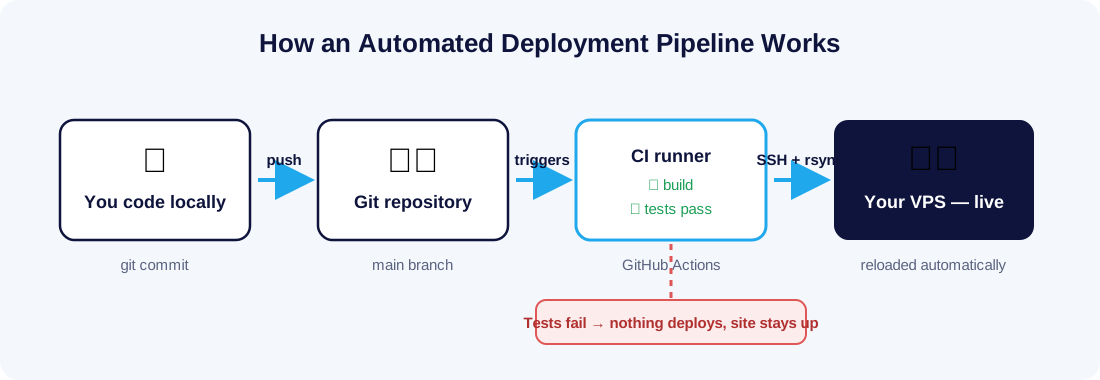
CI/CD stands for Continuous Integration and Continuous Deployment. In practice it means: every time you push code to your Git repository, an automated pipeline builds your project, runs your tests, and — if everything passes — copies the result to your server and reloads your app. No dragging files, no missed uploads, no guessing.
The two halves do different jobs:
- Continuous Integration (CI) automatically builds and tests your code on every push, so broken code is caught before it reaches your server.
- Continuous Deployment (CD) automatically ships code that passed CI to your VPS, the same way every time.
You do not need Kubernetes, Docker, or a DevOps team for this. A Git repository, a free CI runner like GitHub Actions, and a VPS with SSH access are enough.
What You Need Before You Start
- A VPS with SSH access. Any Linux server works — if you are still on shared hosting with FTP-only access, that is the first thing to change. An affordable Linux VPS plan is more than enough for this workflow.
- Your code in a Git repository on GitHub (the steps are nearly identical for GitLab CI/CD or Gitea). New to Git? The free Pro Git book covers everything.
- Basic terminal comfort. If you have never SSH'd into a server, read our guide on connecting to your VPS via SSH from Windows and Mac first.
Step 1: Prepare Your VPS for Automated Deployments
First, create a dedicated deploy user on your server. Your pipeline should never log in as root.
sudo adduser --disabled-password deploy
sudo mkdir -p /var/www/myapp
sudo chown deploy:deploy /var/www/myapp
Next, generate an SSH key pair that the pipeline will use to log in. Run this on your local machine (not the server):
ssh-keygen -t ed25519 -f deploy_key -N "" -C "github-actions-deploy"Add the public key to the deploy user on your VPS:
sudo mkdir -p /home/deploy/.ssh
cat deploy_key.pub | sudo tee -a /home/deploy/.ssh/authorized_keys
sudo chown -R deploy:deploy /home/deploy/.ssh
sudo chmod 700 /home/deploy/.ssh && sudo chmod 600 /home/deploy/.ssh/authorized_keys
If this is a brand-new server, our Linux VPS setup guide for beginners walks through users, firewalls, and web server basics in more detail.
Step 2: Add Your Server Details as GitHub Secrets
Never put server credentials in your repository. In your GitHub repo, go to Settings → Secrets and variables → Actions and add three secrets:
VPS_HOST— your server's IP address or hostnameVPS_USER—deployVPS_SSH_KEY— the full contents of the privatedeploy_keyfile
Secrets are encrypted, masked in logs, and available to your workflow only at run time.
Step 3: Create the Deployment Workflow
Create a file at .github/workflows/deploy.yml in your repository:
name: Deploy to VPS
on:
  push:
    branches: [main]

jobs:
  deploy:
    runs-on: ubuntu-latest
    steps:
      - uses: actions/checkout@v4

      # Build and test — adapt to your stack
      - run: npm ci
      - run: npm test
      - run: npm run build

      - name: Set up SSH
        run: |
          mkdir -p ~/.ssh
          echo "${{ secrets.VPS_SSH_KEY }}" > ~/.ssh/id_ed25519
          chmod 600 ~/.ssh/id_ed25519
          ssh-keyscan -H "${{ secrets.VPS_HOST }}" >> ~/.ssh/known_hosts

      - name: Deploy over rsync
        run: |
          rsync -az --delete ./dist/ \
            "${{ secrets.VPS_USER }}@${{ secrets.VPS_HOST }}:/var/www/myapp/"

      - name: Reload the app
        run: |
          ssh "${{ secrets.VPS_USER }}@${{ secrets.VPS_HOST }}" \
            "sudo systemctl reload myapp"
Three things to notice. The workflow only runs on pushes to main, so feature branches never touch production. The npm test step is a gate — if tests fail, deployment never happens. And rsync only transfers files that actually changed, so deploys take seconds even on large projects.
Deploying a PHP site? Drop the build steps and rsync your project folder directly. Running a Node.js app or containers? See our guide to containerizing and deploying Node.js applications for a Docker-based variant of the same pipeline.
Step 4: Push and Watch It Deploy
That is the whole setup. From now on, deployment is:
git add .
git commit -m "Update pricing page"
git push
Open the Actions tab in your repository and watch the pipeline build, test, and deploy in real time. A typical small-site deploy finishes in under a minute — and it runs exactly the same way whether it is your first deploy of the day or your fifteenth.
Level Up: Zero-Downtime Deploys and Instant Rollbacks
The pipeline above syncs files into a live folder, which is already far safer than FTP. The professional pattern goes one step further: upload each deploy into its own timestamped folder, then atomically switch a symlink.
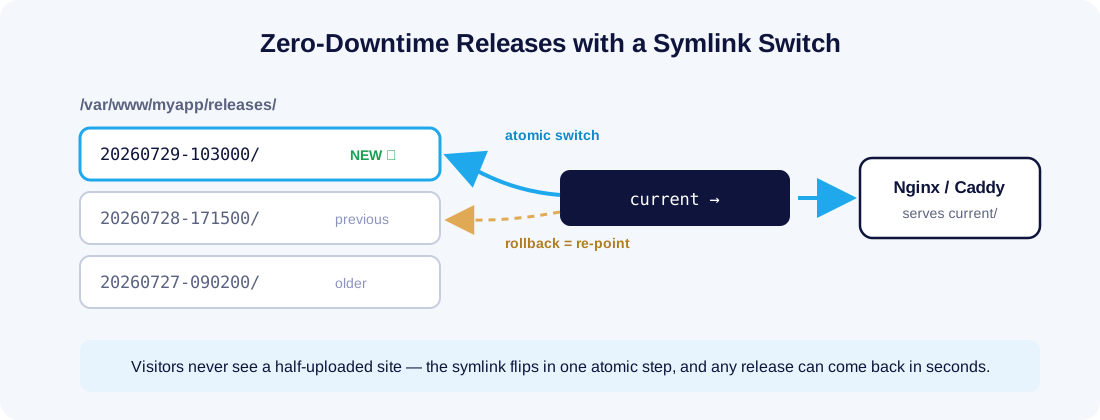
/var/www/myapp/releases/20260729-103000/   <- new deploy lands here
/var/www/myapp/releases/20260728-171500/
/var/www/myapp/current -> releases/20260729-103000/
Your web server points at current. Because switching a symlink is atomic, visitors never see a half-deployed site. And if a release turns out to be broken, rollback is one command — point the symlink back at the previous folder:
ln -sfn /var/www/myapp/releases/20260728-171500 /var/www/myapp/currentCompare that with FTP, where "rollback" means finding last week's backup and re-uploading it while customers wait.
Lock It Down: Security Wins You Get for Free
Moving to CI/CD is also a security upgrade — if you finish the job:
- Uninstall or disable your FTP server entirely. If nothing deploys over FTP anymore, port 21 should not be open:
sudo systemctl disable --now vsftpd. - Use SSH keys only. Disable password login in
/etc/ssh/sshd_config(PasswordAuthentication no) so brute-force attacks have nothing to guess. - Rate-limit what remains. A tool like Fail2Ban bans IPs that hammer your SSH port — here is how to secure your Linux server with Fail2Ban.
- Keep the deploy user boring. It should own the app folder and be allowed to reload the app service — nothing more. Grant that one command via a narrow
sudoersrule rather than full sudo.
For the bigger picture, our Linux security best practices checklist covers updates, firewalls, and monitoring.
FTP vs CI/CD at a Glance
| Manual FTP | CI/CD Pipeline | |
|---|---|---|
| Deploy time | 5–30 minutes, hands-on | Under a minute, automatic |
| Rollback | Restore from backup manually | One command (or one click) |
| Testing before deploy | None | Every push, automatically |
| Partial-upload risk | High | None (atomic switch) |
| Credential security | Password, often plain text | Encrypted secrets + SSH keys |
| Team-friendly | Conflicts and overwrites | Full Git history of every deploy |
| Cost | Free | Free (GitHub Actions free tier) |
Final Thoughts
Retiring FTP is one of those rare upgrades that makes you faster and safer at the same time. An afternoon of setup buys you tested deploys, one-command rollbacks, and a server that no longer accepts passwords from the internet. Start with the simple rsync workflow above, and grow into zero-downtime releases when you need them.
All you need is a server you control. VPS Malaysia's Linux VPS hosting gives you full root and SSH access on NVMe hardware in our MY03 datacenter — so your pipeline deploys in milliseconds, and your visitors in Malaysia and Southeast Asia feel the difference. Push code, not files.