
Running large language models on your own hardware has gone from hobbyist curiosity to a serious option in 2026. Open-weight models now rival the proprietary giants for many tasks, and running them locally means total data privacy, no per-token bills, no rate limits, and the freedom to fine-tune whatever you like. The catch is memory: the models worth running rarely fit on one graphics card. This guide walks through building a multi-GPU server for local LLM inference — how to size it, which parts actually matter, and how to get a model split across two or more GPUs — plus an honest look at when building your own is the wrong call.
Step 1: Start With the Model, Not the Hardware
Every decision in a build flows backwards from one question: which models do you want to run? The dominant cost of LLM inference is VRAM, and the arithmetic is simple enough to do on a napkin. A model stores its parameters as numbers, and the precision you store them at sets the memory bill. At 16-bit precision, every billion parameters costs roughly 2 GB. Quantization — compressing weights to 8, 5 or 4 bits with minimal quality loss — is what makes local inference practical: a 4-bit (Q4) model needs only about 0.6 GB per billion parameters, plus headroom for the context window and the KV cache that grows with it.
In practice, that works out to:
| Model size | Approx. VRAM at Q4 | What it takes |
|---|---|---|
| 7–9B | 5–7 GB | Any modern 8 GB+ GPU |
| 13–14B | 9–11 GB | One 12–16 GB GPU |
| 27–34B | 17–22 GB | One 24 GB GPU, nearly full |
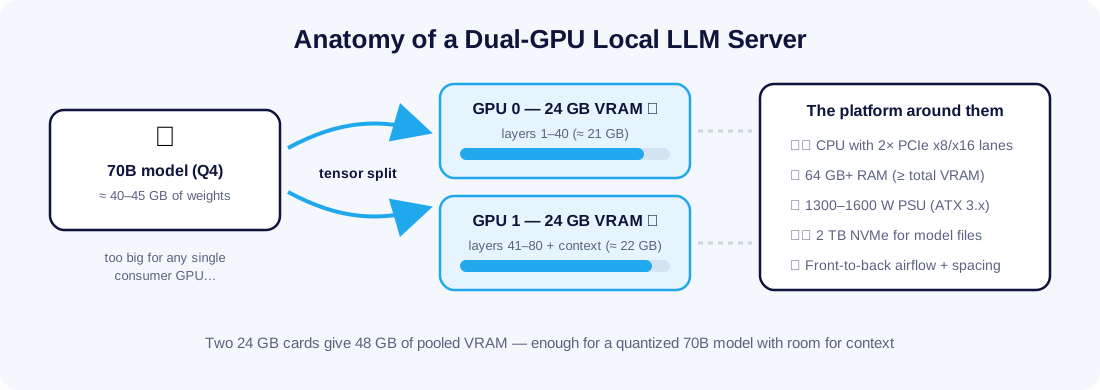
| 70–72B | 40–45 GB | Two 24 GB GPUs |
| 100B+ / MoE | 60 GB+ | Three or more GPUs, or datacenter cards |
The 70B class is where local models get genuinely impressive — and it is exactly the point where a single consumer card gives up. That is why "multi-GPU" and "serious local LLM" are almost synonyms. Browse the current open-weight catalogue on Hugging Face, pick the largest model family you realistically want, and let its Q4 size set your VRAM target.
Step 2: Choosing the GPUs
For inference workloads, prioritise in this order: VRAM capacity, memory bandwidth, then compute. Token generation is memory-bound — the GPU spends most of its time streaming weights out of VRAM, not doing math — so a card with more, faster memory beats a card with more cores.
- The value pick: used RTX 3090 (24 GB). Years after release it remains the community favourite for one reason: no other card comes close on VRAM per dollar, and its ~936 GB/s of memory bandwidth still produces very usable token rates. Two of them give you the 48 GB pool a 70B Q4 model needs.
- The performance picks: RTX 4090 (24 GB) and RTX 5090 (32 GB). Faster memory and much faster prompt processing. A pair of 5090s yields 64 GB — comfortable space for 70B models with long contexts.
- Datacenter cards: A100, H100, H200. 80–141 GB each, designed to run flat-out around the clock — and priced accordingly. These usually make sense rented rather than owned; our overview of NVIDIA H200 GPUs for AI workloads explains what that class of hardware changes.
Two multi-GPU myths worth killing early. First, you do not need NVLink for inference — during generation, only small activation tensors cross between cards, and ordinary PCIe handles that with a barely measurable penalty. Second, you can mix different GPUs: llama.cpp happily splits a model across, say, a 3090 and a 4070 in proportion to their VRAM. (vLLM's tensor parallelism is the exception — it wants identical cards.)
Step 3: The Platform Around the GPUs
The un-glamorous parts sink more builds than the GPUs do. Four things to get right:
- PCIe lanes. Consumer CPUs expose limited lanes, so a second GPU often runs at x8 or x4. For inference this is largely fine — the model loads once and stays resident — but if you plan three or more cards, workstation and server platforms (Threadripper, EPYC, Xeon) with 64+ lanes are the clean solution, and used server boards are a bargain.
- Power supply. Budget roughly 350–450 W per high-end card plus ~200 W for the rest of the system, on a quality ATX 3.x unit — 1300–1600 W for a dual-GPU box. A useful trick: capping each card with
nvidia-smi -plat 70–80% of its default limit typically costs only a few percent of inference speed while dramatically cutting heat and noise. - Cooling and spacing. Two triple-slot cards stacked against each other will throttle. Pick a case with genuine airflow and slot spacing, or use PCIe riser cables to separate the cards. Blower-style and hybrid cards are worth a premium in tight builds.
- RAM and storage. System RAM should at least match total VRAM — 64 GB for a 48 GB build — so models stage smoothly and you can fall back to partial CPU offload. Model files are huge (a single 70B Q4 file is ~40 GB), so a 2 TB NVMe drive is the practical minimum.
Step 4: The Software Stack
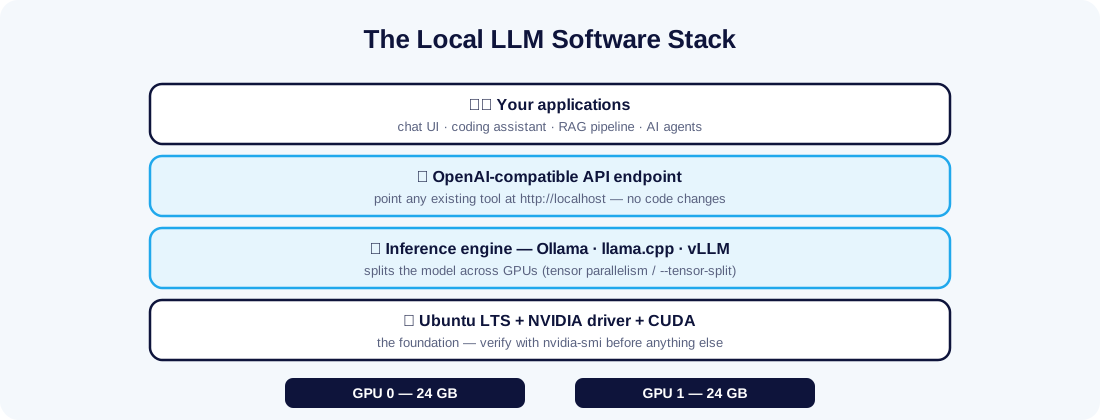
Install Ubuntu LTS, the NVIDIA driver and CUDA toolkit, confirm both cards appear in nvidia-smi, and choose an inference engine:
- Ollama — the easy path. One install,
ollama run, and it spreads a too-big model across your GPUs automatically. Ideal for getting productive on day one. - llama.cpp — the flexible path. Fine-grained control via
--tensor-splitand per-layer offload, runs GGUF quantizations of almost everything, and tolerates mismatched GPUs. - vLLM — the serving path. With
--tensor-parallel-size 2it shards the model for true parallel compute and delivers the highest throughput when many requests arrive at once — the right engine when the server backs a team or an application.
All three expose an OpenAI-compatible API, which is the quiet superpower of the local stack: any tool built for the cloud API can be pointed at your own server by changing one URL. That includes self-hosted AI agents — if you plan to run one, our guide to setting up a personal AI agent pairs naturally with this build.
Three Reference Builds
| Build | Key parts | Pooled VRAM | Comfortable with |
|---|---|---|---|
| Budget | 2× used RTX 3090, Ryzen 9, 64 GB RAM, 1500 W PSU | 48 GB | 70B Q4 chat and coding models |
| Performance | 2× RTX 5090, Ryzen 9 / Core Ultra, 96 GB RAM, 1600 W PSU | 64 GB | 70B with long contexts, fast prompt processing |
| Workstation | 4× 24 GB cards on Threadripper/EPYC, 256 GB RAM, dual PSU | 96 GB | 100B+ models, multi-user vLLM serving |
Used-market prices swing constantly, so treat build budgets as a moving target — the VRAM totals are the stable part of the plan.
A Sanity Checklist Before You Buy Anything
- Name the exact models you want to run and note their Q4 file sizes on Hugging Face.
- Add ~20% to that figure for context and KV cache — this is your true VRAM target.
- Confirm your chosen case physically fits two triple-slot cards with a gap between them, or budget for risers.
- Check your wall circuit: a 1600 W PSU on a shared household circuit is a tripped breaker waiting to happen.
- Price the used options first — last-generation 24 GB cards are the best value in the entire hobby.
- Plan where the machine will live: under a desk, a dual-GPU server under load is roughly as loud as a vacuum cleaner in the next room.
When Building Your Own Is the Wrong Answer
A dual-GPU box under load draws 700–1,000 W — running 24/7, that is a serious line on your electricity bill, plus heat, fan noise and the certainty that today's cards depreciate. And a home server gives you no redundancy: one failed PSU and your "production" assistant is offline.
The honest decision rule: build if you will use it interactively and intermittently; rent if it must serve users around the clock. A hosted GPU server puts datacenter-class cards, redundant power and enterprise bandwidth behind a monthly fee with no capital risk — and for sustained production inference, a dedicated server backing your application while GPUs handle the models is a proven pattern. Many teams land on a hybrid: prototype and fine-tune on a local build, then deploy the winning model to hosted hardware. Our article on dedicated servers for machine learning digs into that production side.
Final Thoughts
A multi-GPU LLM server is one of the most satisfying things a technical person can build in 2026: napkin-math the VRAM, buy memory bandwidth before compute, give the cards clean power and real airflow, and let the software stack do the clever part. Start with the model you actually want to run, size backwards from there, and you will avoid every expensive mistake in this hobby. And when your local experiments outgrow your power socket, the same stack moves to a hosted GPU server in Malaysia without changing a line of your code.