Every Node.js project reaches the same fork in the road: push it to a managed platform that "just runs it", or rent a VPS and run it yourself. The internet's advice splits neatly into two camps — platform fans who never want to see a terminal, and VPS veterans who can't imagine paying per-request prices for a process that idles at 2% CPU. The truth is more useful than either camp admits: each model wins in specific, predictable situations. This guide compares them honestly on cost, control, scaling and effort, then walks through what running Node.js on a Linux VPS actually involves in 2026 — it is far less scary than it used to be.
The Two Models, Defined
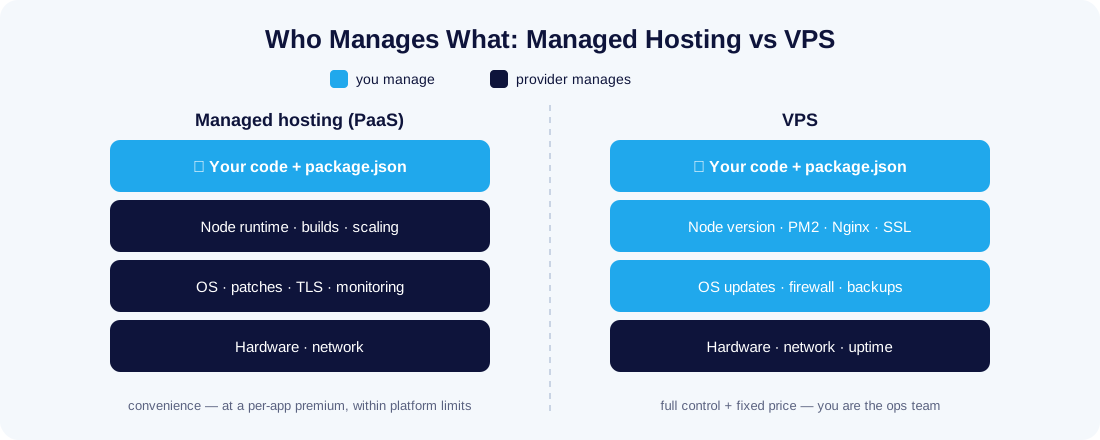
Managed Node.js hosting (platform-as-a-service) means you hand over your repository and the platform does the rest: it detects package.json, builds the app, runs it on infrastructure you never see, attaches HTTPS, and restarts or scales it as needed. You configure environment variables in a dashboard, and deployment is git push. The platform owns the operating system, the runtime, and every operational decision — which is both the appeal and the constraint.
Running Node.js on a VPS means renting a virtual server with root access and building a small production stack on it yourself: the Node runtime, a process manager to keep the app alive, a reverse proxy for SSL and static files, and the OS housekeeping around them. You own everything above the hardware. One server can host several apps, a database, a cache and cron jobs — with no meter running on any of them.
Head-to-Head Comparison
| Managed hosting (PaaS) | VPS | |
|---|---|---|
| Setup effort | Minutes — connect repo, deploy | An afternoon the first time; an hour once you know the recipe |
| Pricing model | Per app / per instance / per usage — grows with success | Fixed monthly price regardless of apps or traffic |
| Control | Runtime versions, regions and limits the platform offers | Root access — any Node version, native modules, any companion service |
| Performance | Shared or burstable; free tiers sleep (cold starts) | Dedicated CPU/RAM, always warm |
| Long-running work | WebSockets, workers and cron often limited or billed extra | Unrestricted — it's your process on your server |
| Scaling | A slider or automatic | Resize the VPS or add servers — manual but predictable |
| Maintenance | None — platform patches everything | Yours: OS updates, firewall, backups |
| Lock-in | Platform-specific config and services accumulate | None — it's standard Linux; the whole stack moves with rsync |
Where Each Model Actually Wins
Cost: the meter vs the flat rate
Managed platforms price per application instance, and the free tiers that make demos effortless put apps to sleep after idle periods — fine for a portfolio project, painful for anything a user might open at 3 a.m. The moment you add a staging environment, a background worker and a small database, one project can cost more per month than an entire VPS that could run ten such projects side by side. The flip side: for a single low-traffic app, a generous free tier costs less than any server. If you want to explore that route first, we've covered how to host a Node.js application for free — including where the free tiers quietly end.
Control: native modules, WebSockets and the 3 a.m. cron job
A VPS runs whatever Linux runs. Native addons that need build tools, a specific Node version pinned for a legacy dependency, Socket.IO with thousands of held-open connections, Puppeteer with a headless browser, a queue worker chewing through jobs overnight — all normal on a VPS, all potential friction on a platform that expects short-lived HTTP handlers. If your app is more than a stateless request/response API, control stops being a luxury.
Effort: the honest cost of a VPS
The real price of a VPS is responsibility, not difficulty. Ubuntu LTS upgrades, firewall rules, SSH hygiene and backups are your job; our Linux security best practices checklist covers the non-negotiables in an evening. What has changed since the days when this argument favoured PaaS by a mile: the VPS workflow is now largely automated too — a CI/CD pipeline deploys your code to the VPS on every push, and containers make the environment reproducible if you prefer that route (see containerizing and deploying Node.js apps).
Performance: dedicated resources vs someone else's schedule
Node.js is single-threaded per process, so its throughput is unusually sensitive to CPU consistency. On shared platform tiers, your app competes with strangers for burstable compute, and sleeping free-tier apps add multi-second cold starts to the first request. On a VPS the cores and RAM are yours around the clock: response times stay flat, PM2's cluster mode uses every core, and nothing ever has to wake up. Latency to the user is the other half of the story — most managed platforms run in a handful of US and EU regions, so an app serving Malaysian users from Virginia adds ~200 ms to every request before your code even runs. A server in the region your users live in beats any platform optimisation.
How to Run Node.js on a VPS: The Production Recipe
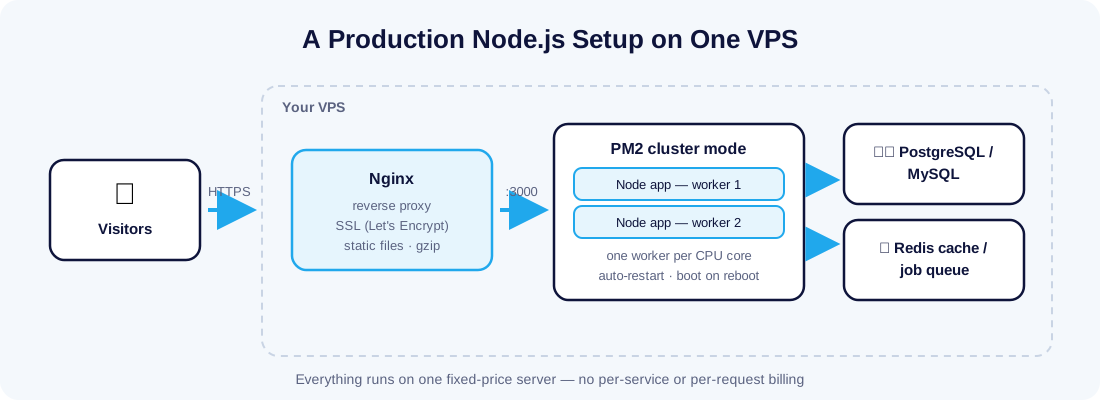
Here is the whole stack, end to end — the same architecture nearly every production Node deployment on a VPS converges on:
- Connect and prepare the server. SSH in (our SSH guide for Windows and Mac covers keys), create a non-root user, enable the firewall allowing only SSH and HTTP/HTTPS. First VPS ever? Start with the Linux VPS setup guide for beginners.
- Install Node.js LTS — use the current LTS from the official Node.js downloads (via NodeSource packages or nvm), never the distro's aging default package.
- Run the app under PM2. PM2 is the de-facto process manager:
pm2 start app.js -i maxlaunches one worker per CPU core in cluster mode, restarts crashes automatically, andpm2 startupmakes everything survive a reboot. This single tool replaces most of what a platform's "keep my app alive" feature does. - Put Nginx in front. Nginx terminates SSL, serves static assets directly, compresses responses, and proxies the rest to Node on port 3000. Node is good at JavaScript; Nginx is better at everything else HTTP.
- Add free HTTPS. Certbot issues and auto-renews a Let's Encrypt certificate with two commands.
- Automate deployments. Wire up the CI/CD pipeline from the guide above so every push builds, tests and releases — after which day-to-day operation feels remarkably like a managed platform, minus the invoice.
Mistakes to Avoid When You Switch to a VPS
- Running
node app.jsin a terminal and calling it deployed. The process dies with your SSH session. PM2 (or a systemd unit) is not optional. - Exposing Node directly on port 80. Keep Node on localhost behind Nginx — you get SSL, compression and static-file speed for free, and one less service running as root.
- Skipping the firewall and fail2ban. A fresh VPS starts receiving SSH probes within minutes of boot. Close everything but 22/80/443 before you deploy anything.
- No backups until the first disaster. A nightly database dump shipped off the server takes ten minutes to set up and has saved more startups than any framework.
- Deploying by editing files on the server. The moment production diverges from your repository, rollbacks become archaeology. Automate from day one.
Decision Guide: Which One Is Right for You?
Choose managed hosting when:
- You're validating an idea and shipping this week matters more than next year's bill;
- The app is a stateless API or site with modest, spiky traffic;
- Nobody on the team wants to own a server, at any price.
Choose a VPS when:
- You run (or will run) several apps, workers or bots — the fixed price amortises immediately;
- You need WebSockets, cron jobs, native modules, or a database on the same box;
- Predictable monthly cost matters, or your users are in a specific region — for Malaysian and Southeast Asian audiences, local hosting cuts every round-trip (see our Node.js VPS hosting plans, which come with the stack above ready to install);
- You want skills and infrastructure that transfer to any provider, forever.
There's also a middle path worth knowing: self-hosted PaaS tools (Coolify, Dokku, CapRover) give you the git-push deployment experience on your own VPS — many teams find this ends the debate entirely.
Final Thoughts
Managed hosting sells you time; a VPS sells you capacity and freedom. Early on, the platform's convenience is usually worth its premium — that's why we still recommend free tiers for prototypes. But the break-even arrives quickly: by the second app, the first WebSocket, or the first month where the platform invoice exceeds the price of a whole server, the VPS wins on every axis except initial effort — and that effort is a well-documented afternoon, once. Learn the recipe once, automate the deployment, and you get platform-grade convenience at server prices, with no meter, no limits and no lock-in.