Introduction: What "From Scratch" Means in 2026
In 2026, building a chatbot from scratch does not mean training a language model. It means owning the pipeline around one: how messages are understood, which knowledge the bot can see, which actions it may take, and how it is served, tested and monitored. That is where your product's quality and safety live.
This guide builds a working support chatbot in about 160 lines of Python. It combines four parts that most production bots share:
- Intent recognition with sentence embeddings, to answer simple requests instantly and route the rest.
- Retrieval-Augmented Generation (RAG) over your own documents, using a vector database.
- An LLM agent loop that can call tools, such as an order-status API.
- A FastAPI service with session memory, ready to put behind a load balancer.
Every snippet here was run end to end before publishing (November 2026, with the package versions below), using the real embedding model and a stubbed LLM endpoint. You can swap in any embedding model and any OpenAI-compatible LLM endpoint, hosted or self-hosted.
Architecture: How a Message Becomes a Reply
The bot is a router in front of an agent: cheap, fast intent classification handles simple requests, and everything else goes to retrieval plus an LLM that may call tools. This keeps latency and LLM cost low for routine traffic while still answering open-ended questions from your own data.
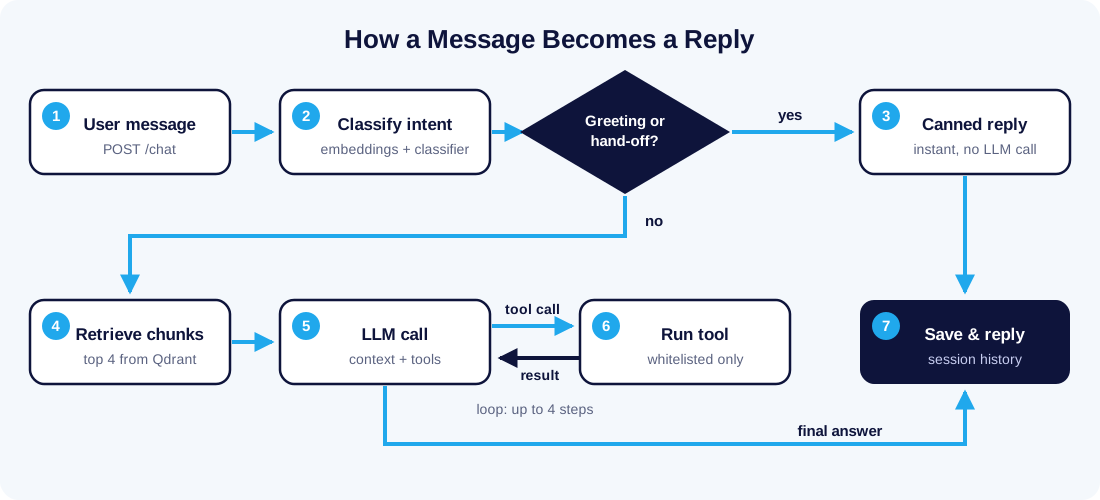
Greetings and hand-off requests return instantly. Every other message pulls the top matching chunks from the vector database, then the LLM answers or calls a tool, up to four times, before the reply is saved to the session.
Key Concepts, Defined
What is intent classification?
Intent classification is the NLP task of mapping a user message to one of a fixed set of goals, such as "refund" or "order_status", so the bot can choose the right response path. Modern systems embed the message into a vector and train a light classifier on a few examples per intent.
What are sentence embeddings?
Sentence embeddings are fixed-length vectors that represent the meaning of a text, so that similar meanings land close together. They power both intent recognition and semantic search in this build.
What is Retrieval-Augmented Generation (RAG)?
Retrieval-Augmented Generation (RAG) is a pattern where the chatbot first searches a knowledge base for relevant passages, then passes them to the LLM as context so its answer is grounded in your data. RAG keeps answers current without retraining the model.
What is fine-tuning?
Fine-tuning is further training of a pre-trained model on your own examples to change its behavior, style or task skill, typically with libraries such as Hugging Face Transformers. It teaches how to respond; it is a poor way to teach facts that change.
What is an LLM agent?
An LLM agent is a loop in which the model decides whether to answer or to call a tool, receives the tool's result, and repeats until it can reply. Tools give the bot live data and actions, such as checking an order or opening a ticket. For how the same idea is applied to business workflows, see our guide to autonomous AI sales agents.
RAG vs Fine-Tuning vs Prompting: Which Does Your Chatbot Need?
Use RAG for knowledge that changes, fine-tuning for behavior and format that must be consistent, and plain prompting for everything you can describe in a few paragraphs. Most production chatbots use prompting plus RAG, and add fine-tuning only when evaluation shows a gap.
| Factor | Prompting only | RAG | Fine-tuning |
|---|---|---|---|
| Best for | Tone, rules, short policies | Product docs, FAQs, policies that change | Strict output formats, domain style, small-model accuracy |
| Fresh data | Manual prompt edits | Re-index a document, live in seconds | Retrain and redeploy |
| Source citations | No | Yes, chunk-level | No |
| Upfront cost | Lowest | Moderate: embeddings and a vector DB | Highest: labeled data and training runs |
| Hallucination control | Weak | Strong when answers are restricted to context | Moderate |
| Main risk | Prompt grows too long | Poor chunking or retrieval returns the wrong passage | Model memorizes stale facts |
A practical rule: if the answer lives in a document, retrieve it. If the problem is how the model answers, not what it knows, consider fine-tuning.
Step 1: Project Setup and Stack
The stack is Python 3.11+, Sentence Transformers for embeddings, scikit-learn for intent classification, Qdrant for vector search, any OpenAI-compatible LLM API, and FastAPI for serving. Each piece is replaceable; the interfaces between them are what matter.
python -m venv .venv && source .venv/bin/activate
pip install "sentence-transformers>=6.2" "scikit-learn>=1.9" "qdrant-client>=1.20" \
            "openai>=3.42" "fastapi>=0.162" "uvicorn>=0.54"
Sentence Transformers installs PyTorch. On a CPU-only server, install the CPU build of PyTorch first (pip install torch --index-url https://download.pytorch.org/whl/cpu) to avoid downloading GPU libraries you will not use.
Project layout, one file per responsibility:
chatbot/
├── intents.py     # embedding model + intent classifier
├── retrieval.py   # chunking, indexing, vector search
├── agent.py       # LLM call, tools, agent loop
└── app.py         # FastAPI endpoint + session memory
Set three environment variables for the LLM: LLM_BASE_URL (leave unset for the provider's default), LLM_API_KEY and LLM_MODEL. Pointing LLM_BASE_URL at a local vLLM or Ollama server runs the whole bot without sending data to a third party; a GPU server is the usual home for that model, as covered in our guide to building a multi-GPU server for local LLMs.
Step 2: Intent Recognition With Embeddings
Embed a handful of example phrases per intent, train a logistic regression on the vectors, and route anything below a confidence threshold to the agent. This gives you a fast, cheap, explainable first layer that needs no GPU. The model used here is BAAI/bge-small-en-v1.5, which produces 384-dimension vectors.
# intents.py
from sentence_transformers import SentenceTransformer
from sklearn.linear_model import LogisticRegression

embedder = SentenceTransformer("BAAI/bge-small-en-v1.5")  # 384-dim, runs on CPU

TRAINING_DATA = {
    "greeting": ["hi", "hello there", "good morning", "hey, anyone around?"],
    "order_status": ["where is my order", "track my package", "has my order shipped yet"],
    "refund": ["I want my money back", "how do I get a refund", "cancel and refund my order"],
    "product_question": ["does the pro plan include backups", "what is the RAM limit",
                         "can I upgrade later", "which plan supports GPUs"],
    "human_agent": ["talk to a person", "I need a human", "connect me to support staff"],
}

texts, labels = [], []
for intent, examples in TRAINING_DATA.items():
    texts += examples
    labels += [intent] * len(examples)

clf = LogisticRegression(C=10, max_iter=1000)  # higher C = sharper probabilities on small data
clf.fit(embedder.encode(texts, normalize_embeddings=True), labels)


def classify(message: str, threshold: float = 0.45) -> tuple[str, float]:
    """Return (intent, confidence). Low-confidence messages fall back to 'unknown'."""
    probs = clf.predict_proba(embedder.encode([message], normalize_embeddings=True))[0]
    best = probs.argmax()
    intent, confidence = str(clf.classes_[best]), float(probs[best])
    return (intent if confidence >= threshold else "unknown"), confidence
Three details that matter in practice:
- The threshold is your safety valve. With only a few examples per class, the default regularization (
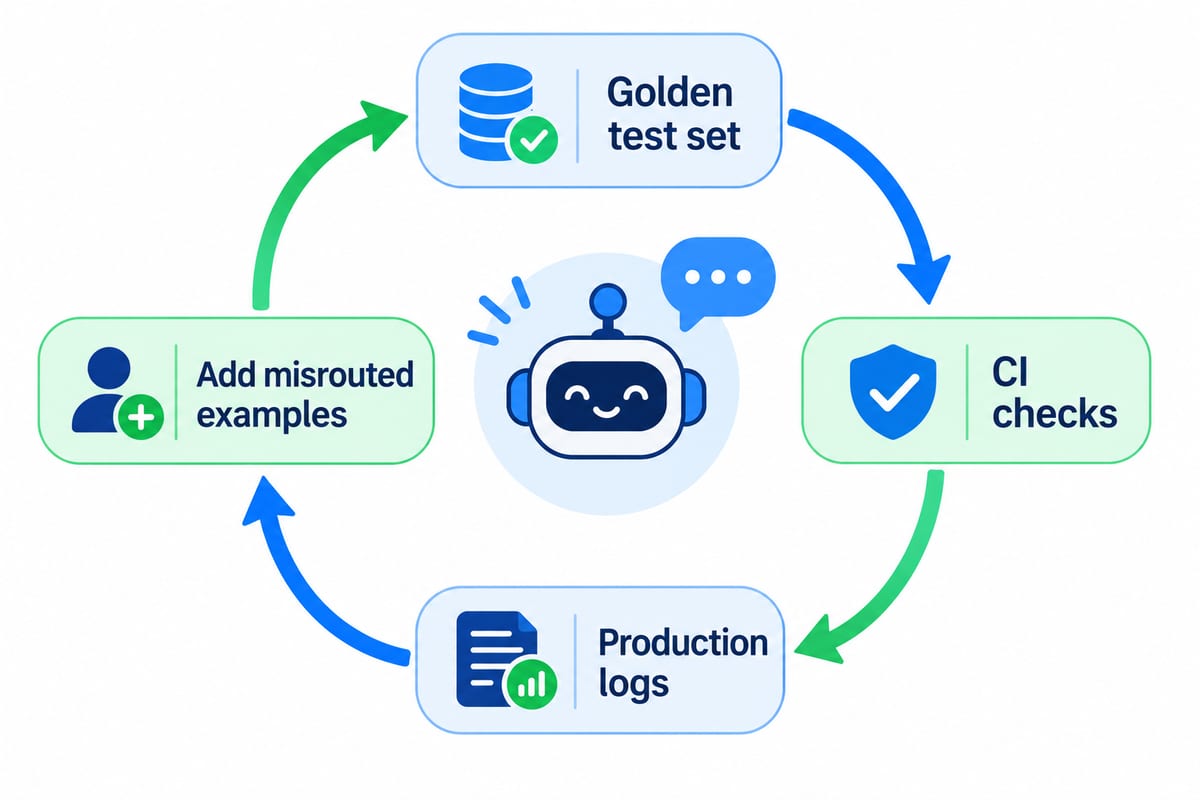
C=1) spreads probability across intents, so even obvious matches can fall under 0.45;C=10sharpens them. In our test run, "hello!" scored 0.40 withC=1and 0.79 withC=10. Tune the threshold on a held-out set, not by eye. - Grow the examples from real logs. Start with 5 to 10 phrases per intent, then add misrouted messages from production every week.
- Keep the intent list short. Only intents with a fixed answer or a fixed action belong here. Open questions go to RAG.
Step 3: Knowledge Retrieval With a Vector Database
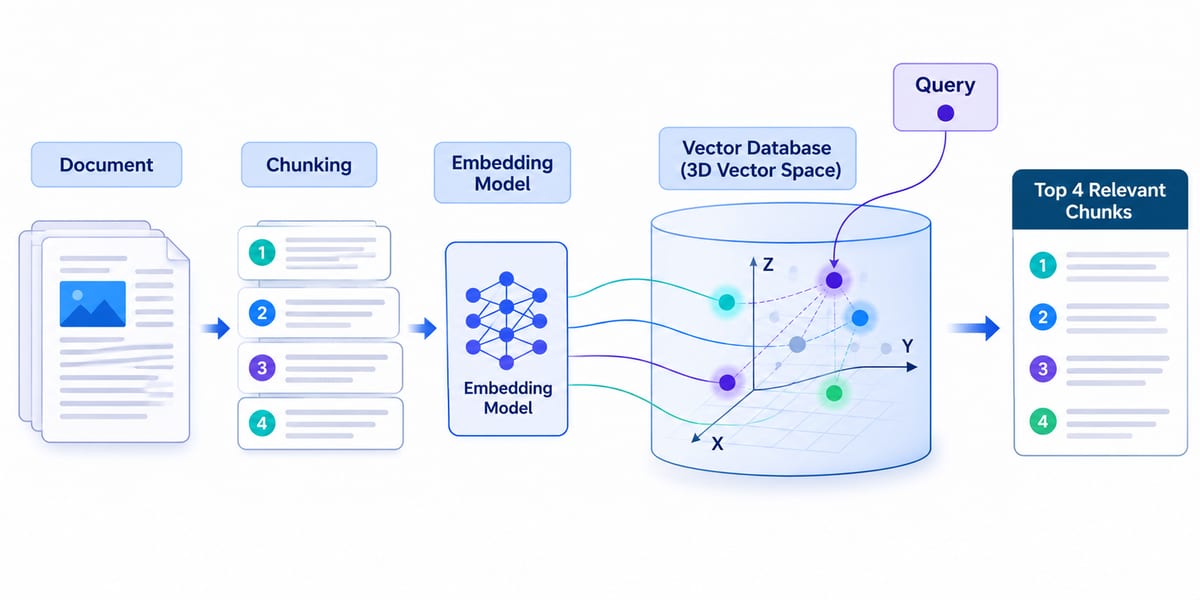
Split documents into overlapping chunks, embed each chunk with the same model used for intents, store the vectors in Qdrant, and return only the top matches above a similarity floor. The floor stops the bot from "answering" with irrelevant text when nothing matches.
# retrieval.py
import uuid

from qdrant_client import QdrantClient
from qdrant_client.models import Distance, PointStruct, VectorParams

from intents import embedder

client = QdrantClient(":memory:")  # use QdrantClient(url="http://localhost:6333") in production
COLLECTION = "docs"
client.create_collection(
    COLLECTION, vectors_config=VectorParams(size=384, distance=Distance.COSINE)
)


def chunk(text: str, size: int = 800, overlap: int = 100) -> list[str]:
    """Split text into overlapping character windows."""
    step = size - overlap
    return [text[i:i + size] for i in range(0, max(len(text) - overlap, 1), step)]


def index_document(doc_id: str, text: str) -> None:
    chunks = chunk(text)
    vectors = embedder.encode(chunks, normalize_embeddings=True)
    client.upsert(COLLECTION, points=[
        PointStruct(id=str(uuid.uuid5(uuid.NAMESPACE_URL, f"{doc_id}:{i}")), vector=v.tolist(),
                    payload={"doc_id": doc_id, "text": c})
        for i, (c, v) in enumerate(zip(chunks, vectors))
    ])


def retrieve(query: str, k: int = 4, min_score: float = 0.5) -> list[dict]:
    vector = embedder.encode([query], normalize_embeddings=True)[0].tolist()
    hits = client.query_points(COLLECTION, query=vector, limit=k).points
    return [{"text": h.payload["text"], "source": h.payload["doc_id"], "score": h.score}
            for h in hits if h.score >= min_score]
Why these choices:
- Deterministic IDs (
uuid5). Re-indexing the same document overwrites its chunks instead of duplicating them. Python's built-inhash()changes between processes, so it is not safe here. - Character chunks with overlap. Simple and good enough to start. Move to heading- or sentence-aware splitting when retrieval tests show answers cut in half.
query_pointsAPI. It is the current Qdrant client call for vector search; older tutorials usesearch, which no longer exists in qdrant-client 1.20.- A similarity floor. Calibrate
min_scoreon real queries; 0.5 is a starting point, not a rule.
Step 4: Generation, Tools and the Agent Loop
The agent sends the question plus retrieved context to the LLM, lets the model request tool calls, feeds the results back, and stops after a fixed number of steps. The step limit and the "answer only from context" instruction are what keep the loop predictable.
# agent.py
import json
import os

from openai import OpenAI

from retrieval import retrieve

# Any OpenAI-compatible endpoint works: a hosted API, vLLM, Ollama or LM Studio.
llm = OpenAI(base_url=os.getenv("LLM_BASE_URL"), api_key=os.getenv("LLM_API_KEY", "local"))
MODEL = os.getenv("LLM_MODEL", "your-model-name")

SYSTEM_PROMPT = (
    "You are a support assistant. Answer only from the provided context or tool results. "
    "If the answer is not there, say you don't know and offer a human agent. "
    "Cite sources as [doc_id]."
)


def get_order_status(order_id: str) -> dict:
    # Replace with a real call to your order system.
    return {"order_id": order_id, "status": "shipped", "eta": "2 business days"}


TOOLS = [{
    "type": "function",
    "function": {
        "name": "get_order_status",
        "description": "Look up the shipping status of an order by its ID.",
        "parameters": {
            "type": "object",
            "properties": {"order_id": {"type": "string"}},
            "required": ["order_id"],
        },
    },
}]
TOOL_FUNCTIONS = {"get_order_status": get_order_status}


def run_agent(message: str, history: list[dict], max_steps: int = 4) -> str:
    context = retrieve(message)
    context_block = "\n\n".join(f"[{c['source']}] {c['text']}" for c in context) or "No context found."
    messages = [
        {"role": "system", "content": SYSTEM_PROMPT},
        *history,
        {"role": "user", "content": f"Context:\n{context_block}\n\nQuestion: {message}"},
    ]
    for _ in range(max_steps):
        response = llm.chat.completions.create(model=MODEL, messages=messages, tools=TOOLS)
        reply = response.choices[0].message
        if not reply.tool_calls:
            return reply.content
        messages.append(reply)
        for call in reply.tool_calls:
            fn = TOOL_FUNCTIONS.get(call.function.name)
            args = json.loads(call.function.arguments or "{}")
            result = fn(**args) if fn else {"error": "unknown tool"}
            messages.append({"role": "tool", "tool_call_id": call.id, "content": json.dumps(result)})
    return "Sorry, I couldn't complete that. Let me connect you to a human agent."
LLM agent architecture: design rules
- Whitelist tools. The model can only call functions in
TOOL_FUNCTIONS; an unknown name returns an error instead of executing anything. - Validate arguments. Treat tool arguments as untrusted input. Check types, ownership (is this the caller's order?) and ranges before touching real systems.
- Cap the loop.
max_stepsbounds cost and latency, and guarantees a graceful hand-off when the model gets stuck. - Keep side effects explicit. Read-only tools can run automatically; tools that refund, cancel or email should require a confirmation turn.
Frameworks such as LangChain, LlamaIndex or an agent SDK wrap this loop for you. Writing it once by hand makes it much easier to debug theirs.
Step 5: Serving the Chatbot With FastAPI
Expose one /chat endpoint that classifies the message, answers canned intents directly, sends everything else to the agent, and keeps a short per-session history.
# app.py
from collections import defaultdict

from fastapi import FastAPI
from pydantic import BaseModel

from agent import run_agent
from intents import classify

app = FastAPI(title="Custom NLP Chatbot")
sessions: dict[str, list[dict]] = defaultdict(list)  # use Redis or a database in production

CANNED = {
    "greeting": "Hi! Ask me about your order, a refund or our plans.",
    "human_agent": "Connecting you to a support agent now.",
}


class ChatRequest(BaseModel):
    session_id: str
    message: str


class ChatResponse(BaseModel):
    reply: str
    intent: str
    confidence: float


@app.post("/chat", response_model=ChatResponse)
def chat(req: ChatRequest) -> ChatResponse:
    intent, confidence = classify(req.message)
    if intent in CANNED:
        reply = CANNED[intent]
    else:
        reply = run_agent(req.message, sessions[req.session_id][-6:])
    sessions[req.session_id] += [
        {"role": "user", "content": req.message},
        {"role": "assistant", "content": reply},
    ]
    return ChatResponse(reply=reply, intent=intent, confidence=confidence)
Run it and send a test message:
uvicorn app:app --reload
curl -s localhost:8000/chat -H 'Content-Type: application/json' \
     -d '{"session_id": "demo", "message": "where is order A1?"}'
The endpoint is a plain def, so FastAPI runs it in a worker thread and the blocking model and LLM calls do not freeze the event loop. Returning intent and confidence in every response makes routing errors visible in your logs from day one. FastAPI also generates interactive docs at /docs.
For production, run uvicorn behind a reverse proxy on a Linux server: our guides cover configuring Nginx as a reverse proxy and automating deployments with CI/CD, and a Linux KVM VPS gives the bot its own always-on environment.
Step 6: Evaluation, Guardrails and Production Checklist
Treat the chatbot like any other service: a versioned test set, automated checks on every change, and dashboards on what users actually ask. Without an evaluation set, every prompt tweak is a guess.
Start with a golden set of real questions and expected outcomes, and run it in CI:
# test_golden.py  (run with pytest)
from intents import classify
from retrieval import index_document, retrieve

INTENT_CASES = [("hello!", "greeting"), ("get me a human please", "human_agent")]


def test_intents():
    for text, expected in INTENT_CASES:
        assert classify(text)[0] == expected, text


def test_retrieval_finds_backup_policy():
    index_document("plans", "The Pro plan includes daily backups kept for 14 days.")
    sources = [hit["source"] for hit in retrieve("are backups included in pro?")]
    assert "plans" in sources
Production checklist:
- Evaluation: track intent accuracy, retrieval hit rate (did the right document appear in the top k?) and answer faithfulness (is every claim supported by the context?).
- Guardrails: cap input length, strip or flag prompt-injection patterns in retrieved text, and never let tool output reach the user unfiltered.
- Privacy: redact personal data before logging; keep the LLM on a self-hosted endpoint if conversations must not leave your network.
- State: move
sessionsto Redis or Postgres so the API can scale horizontally. - Observability: log intent, confidence, retrieved sources, tool calls and latency per request.
- Fallback: every failure path ends in a clear hand-off to a human, never a silent error.
Conclusion: Own the Pipeline, Rent the Model
A custom NLP chatbot in 2026 is four small, testable parts: an intent router, a retrieval layer, an agent loop with whitelisted tools, and an API with session state. Each part can be swapped without touching the others, which is the real advantage of building it yourself.
Start with the code above, index ten of your real support documents, and write twenty golden test questions before you touch the prompt. Then let production logs tell you what to improve next.
Next step: copy the four files, point LLM_BASE_URL at your model of choice, and run the golden tests. If they pass, you have a chatbot you can ship and measure. If you would rather run ready-made automation alongside it, see our AI Automation VPS plans.