

Introduction: The Gap Between Click and Fill
In forex, the price you see is not always the price you get. Between the moment your Expert Advisor (EA) sends an order and the moment your broker's server confirms it, the market keeps moving. That gap is measured in milliseconds, and for scalpers and automated systems it decides whether a strategy is profitable on paper or in the account.
Most retail traders in Malaysia still run MetaTrader 4 or MetaTrader 5 on a home PC. The order then travels over home Wi-Fi, a consumer broadband line and several network hops before it reaches the broker. A Forex VPS Malaysia setup moves the terminal into a data centre with a stable, low-latency path to the broker, running 24/5 without depending on your laptop, your router or your electricity supply.
This guide answers three practical questions:
- What forex slippage is, and how latency causes it.
- How many milliseconds actually matter for your strategy.
- How to choose the right VPS location, with or without a local Malaysia server, to reduce forex slippage.
What Is Forex Slippage?
Forex slippage is the difference between the price you request when placing an order and the price at which the broker actually fills it. It happens when the market moves, or available liquidity changes, during the time it takes your order to reach the broker and be executed.
Slippage works in both directions:
- Negative slippage: you are filled at a worse price than requested (for example, buying EUR/USD at 1.08455 instead of 1.08450, a 0.5-pip cost).
- Positive slippage: you are filled at a better price than requested, when the market moves in your favour during execution.
- Requotes: on instant-execution accounts, the broker rejects the original price and offers a new one, which costs time and the opportunity.
Slippage is caused by three things: price volatility (news, session opens), liquidity depth at your price level, and execution delay. You cannot control the first two. The third, latency, is the part a trader can actually engineer down.
How Does Latency Impact Order Execution?
Latency is the round-trip time (RTT) for your order to travel from your trading terminal to the broker's trade server and for the confirmation to come back, measured in milliseconds (ms). The longer the round trip, the more the price can move before your order is filled, and the higher the chance of slippage or a requote.
Every market order follows the same path:
- Your EA or manual click generates the order inside MT4/MT5.
- The order leaves your machine through the local network (Wi-Fi or LAN).
- It crosses your ISP and the public internet, hop by hop.
- It reaches the broker's access point or trade server.
- The broker's bridge matches it with a liquidity provider and confirms the fill back to you.
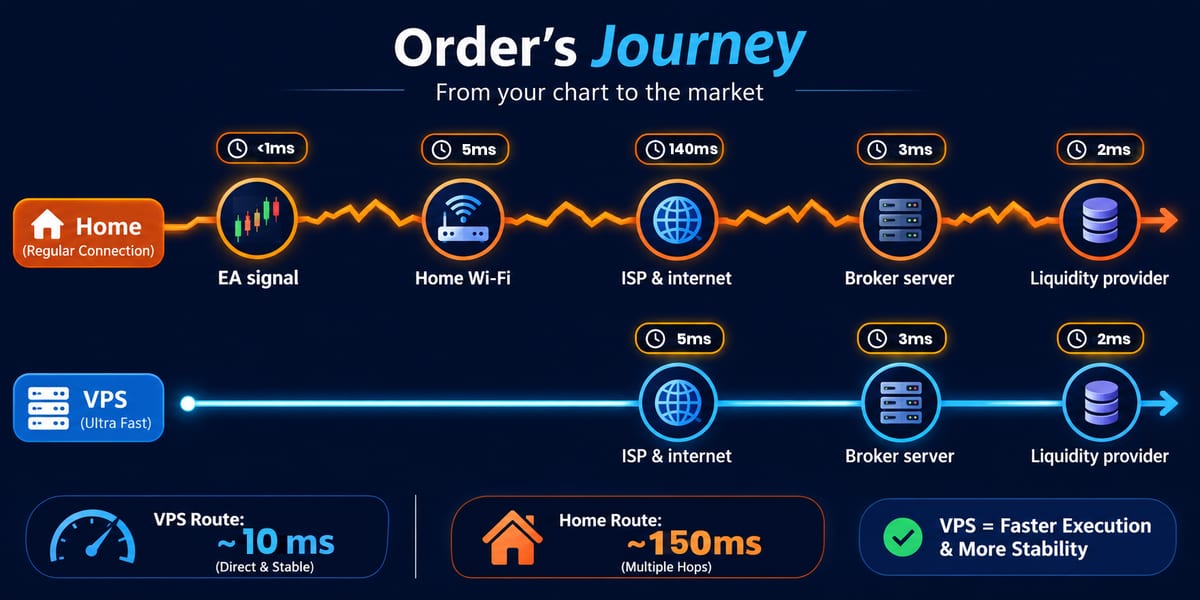
Steps 2 and 3 are where a home setup loses the most time, and they are exactly what a VPS replaces. Physics sets the floor: light in optical fibre travels at roughly 200,000 km/s, which works out to about 1 ms of round-trip time for every 100 km of cable, before any routing overhead.
| Stage of the order path | Home PC in Malaysia | Forex VPS near the broker |
|---|---|---|
| Local network (Wi-Fi/LAN) | 1–10 ms, spikes on busy Wi-Fi | Not applicable (server is on a data-centre LAN) |
| ISP and internet routing | Variable; depends on provider and time of day | Short, stable data-centre transit |
| Distance to broker server | Same as VPS if the broker is local; far worse if overseas | Chosen to match the broker's location |
| Uptime of the machine | Depends on your PC, power and router | 24/5 in a data centre with redundant power |
| Jitter (variation in ms) | Often high | Typically low and consistent |
Ranges are illustrative. Measure your own path using the steps later in this guide.
How Many Milliseconds Matter? Latency by Trading Style
For most retail scalpers and EA traders, a stable round trip under about 10 ms to the broker's server is the bar to aim for; swing traders can tolerate 50 ms or more because their edge does not depend on the first second after entry. What matters is how latency compares with the size of your target.
| Trading style | Typical holding time | Latency bar to aim for | What matters most |
|---|---|---|---|
| HFT / latency arbitrage | Milliseconds | Under 1 ms (cross-connect in the broker's data centre) | Colocation, not a standard VPS |
| Scalping EAs | Seconds to minutes | Under ~10 ms | Distance to broker, low jitter |
| Intraday / day-trading EAs | Minutes to hours | Under ~30–50 ms | Consistency and 24/5 uptime |
| Swing / position trading | Days to weeks | Latency rarely limiting | Uptime, so the EA never misses a signal |
A quick slippage calculation
Assume EUR/USD moves 10 pips in one second during a news release, roughly 1 pip every 100 ms (an illustrative figure, not a forecast):
- 150 ms round trip (home PC to an overseas broker): about 1.5 pips of price movement while your order is in flight.
- 5 ms round trip (VPS close to the broker): about 0.05 pips.
For a scalper targeting 3 to 5 pips, the first case can consume between a third and half of the expected profit on a fast move. For a swing trader targeting 150 pips, the same delay is noise. That is why the answer to "how many milliseconds matter" depends on your strategy, not on a single number.
Home PC vs Local Malaysia VPS vs Overseas VPS
A local Malaysia VPS gives the lowest latency when your broker's trade server sits in Malaysia or nearby Singapore; if the server is in Amsterdam, London or New York, a VPS in that city wins, no matter where you live. Your Remote Desktop connection to the VPS can be slow without affecting execution, because orders travel from the VPS, not from your screen.
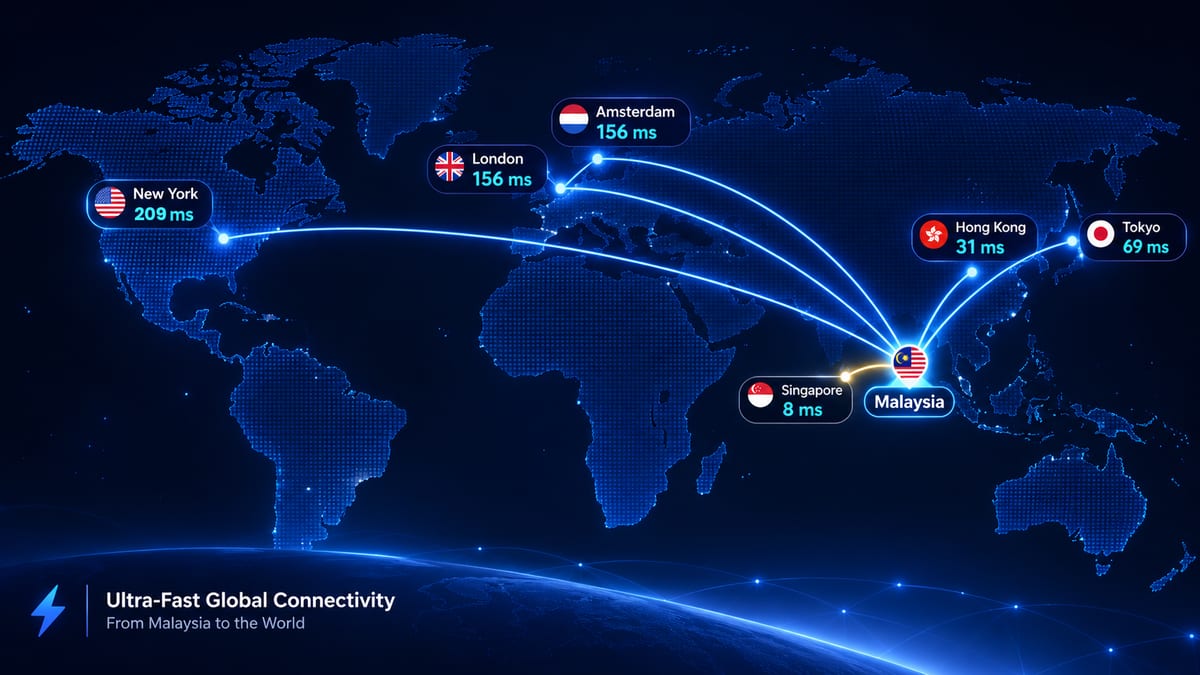
Published backbone measurements show how quickly distance adds up from this region: roughly 31 ms Singapore–Hong Kong, 69 ms Singapore–Tokyo, 156 ms Singapore–London and 209 ms Singapore–New York (October 2026 measurements).
| Setup | Broker server in Malaysia / Singapore | Broker server in Amsterdam / London | Runs 24/5 without your PC? |
|---|---|---|---|
| Home PC in Malaysia | Roughly 5–20 ms plus home Wi-Fi jitter | Roughly 160–200+ ms | No |
| Forex VPS in Malaysia | Low single digits to ~10 ms | Roughly 160+ ms | Yes |
| Forex VPS in the broker's city | Same as above if in Asia | Low single digits | Yes |
Figures are typical ranges drawn from public backbone data; your route will differ. Always ping your own broker's server before choosing.
The practical rule: match the VPS to the broker's server, not to your home address. A Kuala Lumpur scalper using a broker hosted in Amsterdam gains more from an Amsterdam VPS than from any local server.
Where Does Your Broker's Server Live?
Most forex broker trade servers cluster in a handful of financial data centres, so the single biggest latency decision is picking the VPS location closest to your broker's MT4/MT5 server. Hardware upgrades cannot recover distance.
The main hubs, most of them Equinix financial data centres:
- Equinix NY4 (New York/New Jersey): the core hub for US-facing brokers and ECNs.
- Equinix LD4 (London) and Amsterdam data centres: where a large share of European and offshore retail brokers host their MetaTrader servers.
- Equinix TY3 (Tokyo), SG1 (Singapore) and HK1 (Hong Kong): the Asia-Pacific hubs. Institutional venues such as LMAX run matching engines in LD4, NY4, TY3 and SG1.
- Malaysian data centres (Cyberjaya and Kuala Lumpur): used by some Asia-focused brokers and by local VPS providers.
Regional brokers often split servers by client region. A broker may run a "Real" server in Amsterdam for global clients and another in Asia for local ones, so check the exact server name in your MT4/MT5 login, not just the broker brand.
VPS Malaysia's own broker location finder illustrates the spread: it lists 211 brokers and recommends Amsterdam for 133 broker servers, New York for 52 and Malaysia for 27 (one broker appears in two locations). In other words, a Malaysian trader's fastest VPS is frequently not in Malaysia, which is why choosing a provider with several locations matters.
How to find your broker's server location
- Read the server name in MT4/MT5 (File → Login to Trade Account); names often hint at region.
- Check the broker's help centre or ask support where the trade server is hosted.
- Use a provider's broker-latency lookup tool, then verify with your own ping test (see below).
What to Look for in a Forex VPS Malaysia: Checklist
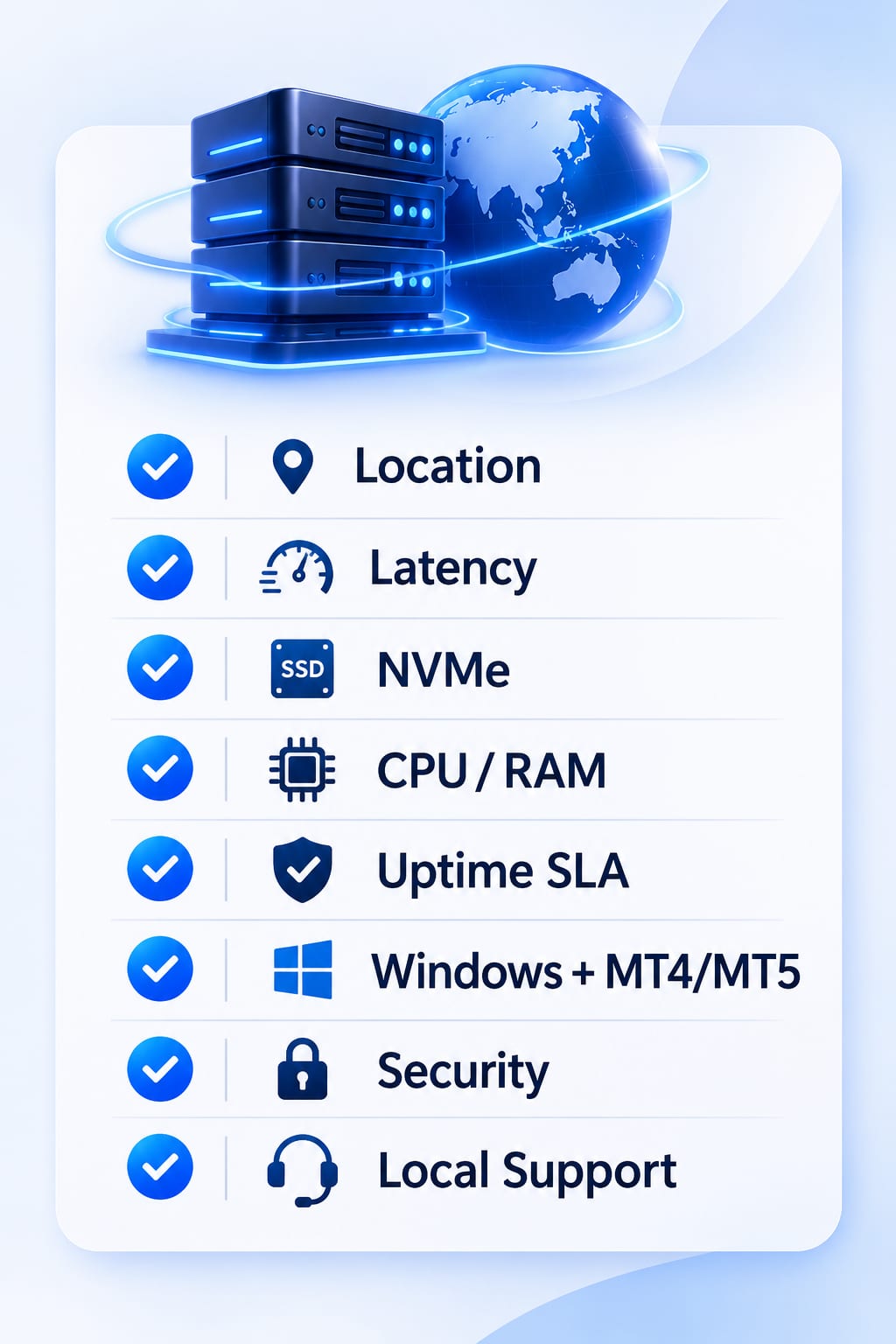
The right EA trading VPS is the one closest to your broker, with enough dedicated resources for your terminals and a written uptime SLA. Use this checklist before you buy:
- Location options: a Malaysia data centre for Asia-hosted brokers, plus Europe and US locations for everything else.
- Measured latency, not marketing claims: ask for a test IP or use a money-back period to ping your broker yourself.
- NVMe SSD storage: faster terminal start-up, log writing and backtests than SATA SSD.
- Dedicated CPU and RAM sized for your terminals: each MT4/MT5 instance with EAs needs memory headroom (see how many MT4 terminals a VPS can run); under-sized plans cause freezes during news.
- Uptime SLA in writing: read the actual SLA page, and check that maintenance is scheduled outside trading hours.
- Windows Server with MT4/MT5 support: pre-installed terminals and RDP access from desktop and mobile save setup time.
- Security: DDoS filtering, firewall defaults and a strong RDP password policy (more in security features to look for in Forex VPS hosting).
- Local billing and support: MYR pricing, local payment methods and support that answers during the Asian session.
Forex VPS Providers Serving Malaysian Traders
Several providers offer MT4 MT5 VPS hosting to Malaysian traders; they differ mainly in locations, storage type and pricing currency. The table lists published entry-level Forex VPS plans as of November 2026. Prices change often, so confirm on each provider's site.
| Provider | Forex VPS locations | Entry Forex VPS plan | Storage | Uptime SLA |
|---|---|---|---|---|
| VPS Malaysia | Malaysia (MY03, Cyberjaya), Amsterdam, New York | From RM37.90/mo (3-year term): 2 vCPU, 2 GB RAM | 50 GB NVMe SSD | 99.9% |
| GB Network Solutions | Malaysia (CJ1, Cyberjaya), Amsterdam, London, New York | From RM38.61/mo (12-month term): 2 cores, 2 GB RAM | 50 GB SSD (Malaysia plan) | 99.9% |
| TradingFXVPS | New York, London, Frankfurt, Amsterdam, Chicago, Singapore, Tokyo, Hong Kong | From $17.50/mo (annual): 1 core, 2 GB RAM | 30 GB NVMe | 99.99% |
Malaysian prices exclude 8% service tax where applicable.
VPS Malaysia (recommended for most Malaysian EA traders)
VPS Malaysia has run hosting from Malaysia since 2012 and offers Forex VPS in its MY03 data centre plus Amsterdam and New York, at the same price in every location. Plans use U.2 NVMe SSD in RAID 10, include pre-installed MT4/MT5, unlimited user logins and no setup fee, and come with a 30-day money-back guarantee and a 99.9% uptime SLA. Forex VPS maintenance is scheduled outside trading hours, and its broker location finder recommends the right data centre for 211 brokers. Billing is in MYR with local payment methods, and support runs 24/7.
Other options
GB Network Solutions (Cyberjaya) covers Malaysia, Amsterdam, London and New York, and its plan cards list 6 to 18 MT4/MT5 terminals per tier. TradingFXVPS, operated by a Singapore Pte Ltd company, is the option if you specifically need a Singapore, Tokyo or Hong Kong server.
Alternative: MetaQuotes also offers built-in virtual hosting from inside MT4/MT5, which suits a single terminal with one EA but gives less control than a full Windows VPS.
How to Measure Your Own Latency to the Broker
The most reliable latency figure is the one you measure from your own terminal to your own broker's server, at the times you actually trade. It takes five minutes:
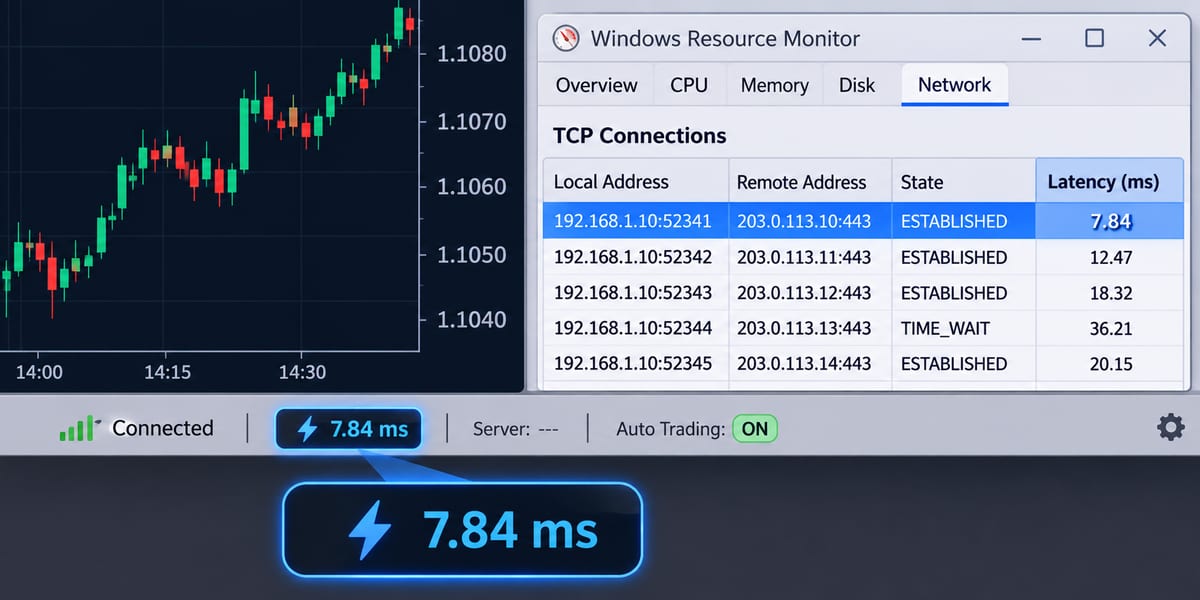
- Read the ping inside MT4/MT5. The connection indicator in the bottom-right corner of the terminal shows the current round trip in ms. Click it and choose Rescan servers so the terminal picks the fastest access point.
- Find the trade server's IP. On Windows, open Resource Monitor → Network → TCP Connections and look for
terminal.exeorterminal64.exe. The remote address is your broker's server, and the Latency (ms) column shows the live round trip. - Repeat the test from the VPS. Log in by Remote Desktop, open the same terminal and compare the numbers side by side with your home PC.
- Test at different times. Check during the Asian open, the London open and around a scheduled news release. Averages hide the spikes that cause slippage.
- Look at jitter, not just the average. A steady 8 ms beats a connection that swings between 3 ms and 60 ms.
Tools such as Speedtest by Ookla measure your home line's speed and ping to a nearby test server, which helps diagnose a poor home connection but does not show latency to your broker.
Other Ways to Reduce Forex Slippage
A VPS removes the latency you control; these habits reduce the slippage caused by volatility and liquidity.
- Set a maximum deviation. Use the
slippageparameter in MT4'sOrderSend()or thedeviationfield in MT5 so the EA rejects fills beyond your tolerance. - Use limit orders where the strategy allows. Limit orders cannot fill at a worse price than set, at the cost of sometimes not filling.
- Respect the economic calendar. Spreads widen and liquidity thins in the seconds around high-impact releases; pause scalping EAs or widen deviation deliberately.
- Trade liquid sessions. The London–New York overlap usually offers deeper liquidity on major pairs than the late US or early Asian hours (see the best time to trade forex in Malaysia).
- Check the broker's execution model. Market execution, instant execution and the broker's liquidity setup all affect slippage, so read the order execution policy.
- Keep the VPS lean. Close unused charts and terminals; CPU or RAM saturation during news adds internal delay that no network can fix.
- Use a properly licensed broker. Before funding an account, check the Securities Commission Malaysia's Investor Alert List and Bank Negara Malaysia's Financial Consumer Alert List for unauthorised entities, and verify the broker's licence with its home regulator, such as the UK FCA register. Our guide to forex trading scams in Malaysia lists the warning signs.
Conclusion: Put Your EA Where Your Broker Is
How many milliseconds matter depends on your strategy: under about 10 ms for scalpers, tens of milliseconds for intraday EAs, and uptime rather than speed for swing traders. The biggest gain comes from placing your terminal close to your broker's server, then keeping that connection stable around the clock.
For Asia-hosted brokers, a local Malaysia VPS removes the home-network delay and keeps the round trip in single digits. For brokers hosted in Europe or the US, a VPS in that city does the same job. Measure first, then choose.
Cut the milliseconds between your EA and your broker. Run MT4/MT5 24/5 on VPS Malaysia's Forex VPS in Malaysia, Amsterdam or New York, from RM37.90/mo with a 30-day money-back guarantee.
Risk disclaimer: Forex and CFD trading carries a high level of risk and may not be suitable for all investors. A VPS improves execution conditions but does not guarantee trading results.
Related reading: Forex Trading Malaysia guide · How to accurately measure latency to your broker from your Forex VPS · How to set up MT4 and an EA on a VPS.


